# MicYou
> MicYou 将 Android 设备转变为 PC 的高质量麦克风,支持 Wi-Fi、USB 多种连接模式,提供专业音频处理功能。
URL: https://micyou.top
---
# 简体中文
---
# 更新日志 - MicYou 版本历史
URL: https://micyou.top/changelog
Description: MicYou 更新日志,查看所有版本的新功能、改进和修复内容。
---
# faq
URL: https://micyou.top/docs/faq
---
title: 常见问题 - MicYou 故障排除
description: MicYou 常见问题解答,包括设备连接问题、防火墙设置、ADB 配置和音频输出故障排除等。
keywords: MicYou常见问题,MicYou故障排除,MicYou无法连接,防火墙设置,ADB问题,音频问题
---
# 常见问题
## 无法连接设备
### Wi-Fi 模式
1. **确认防火墙设置**
Windows 防火墙可能会拦截入站连接。请按照以下方法手动放行端口:
1. 按下 `Win+R`,输入 `powershell`,同时按住 `Ctrl+Shift`,点击「确定」以管理员身份运行 PowerShell。
2. 输入以下命令:
```powershell
New-NetFirewallRule -DisplayName "MicYou-6000-TCP" -Direction Inbound -LocalPort 6000 -Protocol TCP -Action Allow
New-NetFirewallRule -DisplayName "MicYou-6001-UDP" -Direction Inbound -LocalPort 6001 -Protocol UDP -Action Allow
```
> MicYou 默认使用 TCP 端口 `6000`(控制通道)和 UDP 端口 `6001`(音频数据)。如已修改端口号,请将命令中的端口号替换为实际值。
若未出现任何错误提示,表示操作成功,可以重新尝试连接。
2. **检查设备是否在同一子网**
- 确保 Android 手机和 PC 连接的是**同一个**路由器的 Wi-Fi
- 确保路由器已关闭 **AP 隔离** 或 **网络设备隔离** 功能(详情请参阅路由器说明书)
> [!TIP]
> 高级用户可尝试使用 Nmap 或 ping 等工具检查连接性。
### USB (ADB) 模式
1. **开启开发者选项**
> 此处列出的步骤可能不适用于所有设备,**建议使用搜索引擎**查找适用于您设备的 ADB 教程。
- 在手机设置中找到"关于本机",连续点击 7 次"系统版本号"开启开发者选项
- 进入开发者选项,开启 **USB 调试**
2. **确认 ADB 连接**
> 电脑端需要安装 ADB 工具(参见第 1 步:下载 ADB)。
运行以下命令,确认有且仅有一个设备已连接:
```bash
adb devices
```
如果列出了多个设备,则需要指定目标设备进行端口转发:
```bash
adb -s <设备序列号> reverse tcp:6000 tcp:6000
```
> 设备序列号可在 `adb devices` 的输出中找到。
## 连接设备后无声音输出
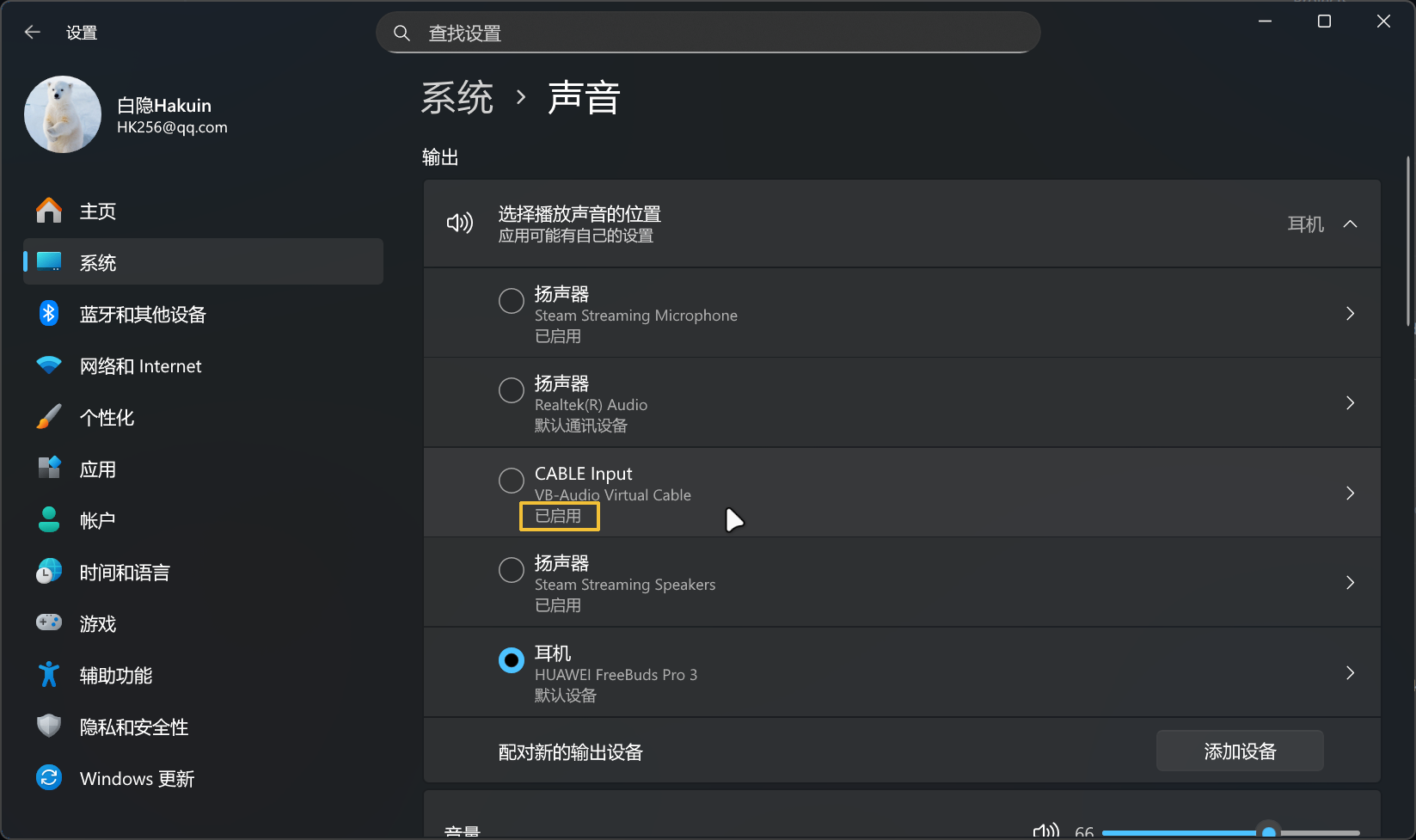
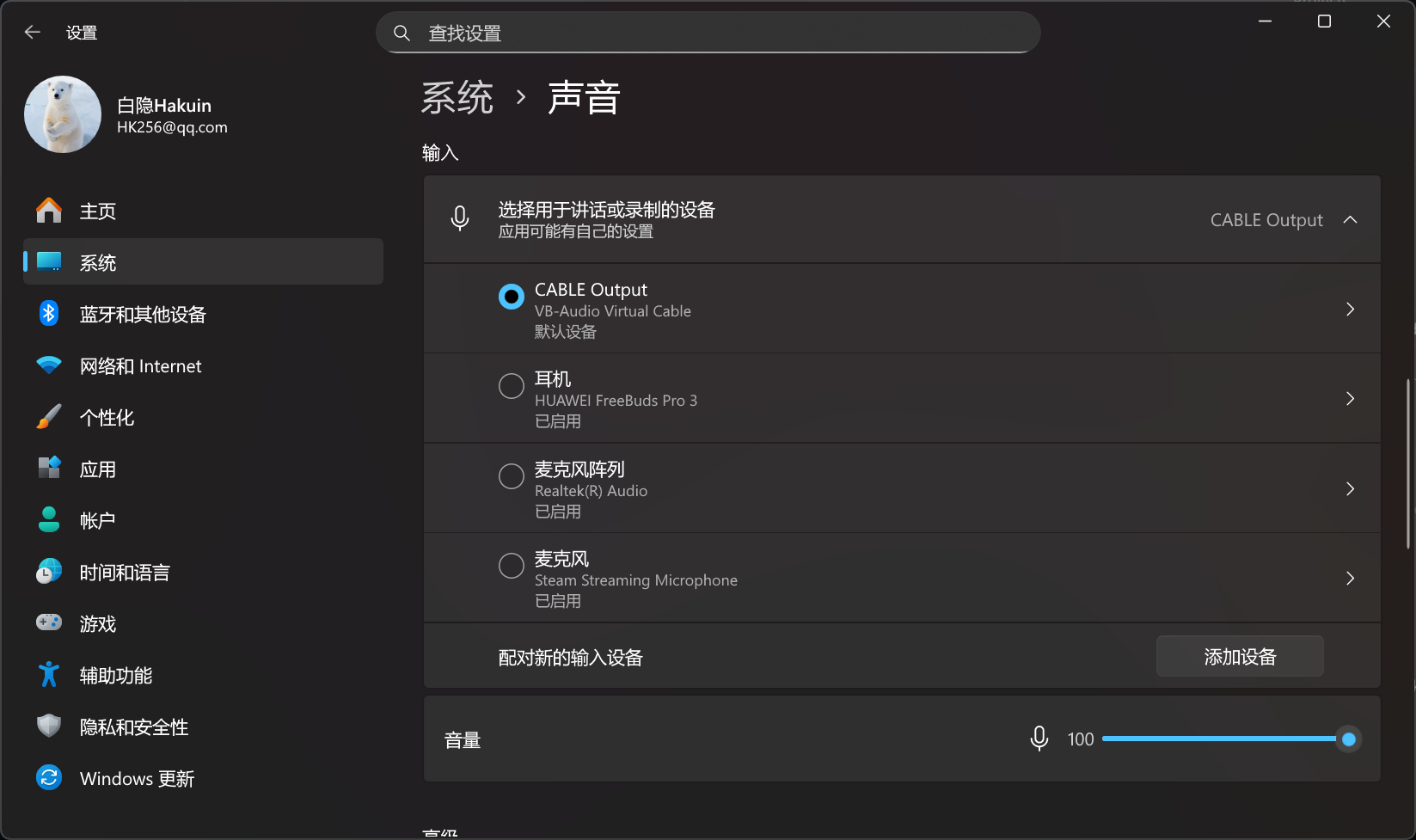
请确保 VB-Audio 驱动已正确安装,且以下设备均**未被禁用**:
- **输出设备**:CABLE Input (VB-Audio Virtual Cable)
- **输入设备**:CABLE Output (VB-Audio Virtual Cable)
检查方式:打开「设置」> 「声音」,验证两个设备均为**已启用**状态:
---
# plugin-api-reference
URL: https://micyou.top/docs/plugin/plugin-api-reference
---
title: MicYou 插件 API 参考
description: MicYou Plugin API 完整接口文档,包含所有类、方法和数据类型的详细说明
keywords: MicYou API,插件接口,PluginContext,PluginHost,音频效果API,Kotlin插件API
---
# MicYou 插件 API 参考
本文档详细描述 MicYou Plugin API 的所有接口、类和方法。
## 目录
- [Plugin](#plugin)
- [PluginManifest](#pluginmanifest)
- [PluginContext](#plugincontext)
- [PluginHost](#pluginhost)
- [PluginDataChannel](#plugindatachannel)
- [PluginInfo](#plugininfo)
- [PluginPlatform](#pluginplatform)
- [PluginUIProvider](#pluginuiprovider)
- [PluginSettingsProvider](#pluginsettingsprovider)
- [AudioEffectProvider](#audioeffectprovider)
- [AudioEffectPlugin](#audioeffectplugin)
- [PluginLocalization](#pluginlocalization)
- [PluginLocalizationProvider](#pluginlocalizationprovider)
- [数据类型](#数据类型)
## Plugin
插件主接口,所有插件必须实现此接口。
```kotlin
interface Plugin {
val manifest: PluginManifest
fun onLoad(context: PluginContext) {}
fun onEnable() {}
fun onDisable() {}
fun onUnload() {}
}
```
### 属性
| 属性 | 类型 | 说明 |
|------|------|------|
| `manifest` | `PluginManifest` | 插件元数据清单,包含插件的基本信息 |
### 方法
#### onLoad
```kotlin
fun onLoad(context: PluginContext)
```
插件加载时调用。这是插件初始化的最佳时机。
**参数:**
- `context` - 插件上下文,提供运行环境访问能力
**调用时机:** 插件包被解析并验证通过后,在插件实例创建后立即调用。
**示例:**
```kotlin
override fun onLoad(context: PluginContext) {
this.context = context
context.log("Plugin ${manifest.name} loaded")
// 访问主机能力
val host = context.host
context.log("Platform: ${host.platform.name}")
}
```
#### onEnable
```kotlin
fun onEnable()
```
插件启用时调用。
**调用时机:** 用户在设置中启用插件时调用。
#### onDisable
```kotlin
fun onDisable()
```
插件禁用时调用。
**调用时机:** 用户在设置中禁用插件时调用。
#### onUnload
```kotlin
fun onUnload()
```
插件卸载时调用。
**调用时机:** 插件被删除或应用关闭时调用。
---
## PluginManifest
插件元数据清单,描述插件的基本信息。
```kotlin
@Serializable
data class PluginManifest(
val id: String,
val name: String,
val version: String,
val author: String,
val description: String = "",
val tags: List = emptyList(),
val platform: PluginPlatform = PluginPlatform.BOTH,
val minApiVersion: String,
val mainClass: String
)
```
### 属性
| 属性 | 类型 | 必需 | 默认值 | 说明 |
|------|------|------|--------|------|
| `id` | `String` | 是 | - | 插件唯一标识符,反向域名格式 |
| `name` | `String` | 是 | - | 插件显示名称 |
| `version` | `String` | 是 | - | 版本号,遵循语义化版本规范 |
| `author` | `String` | 是 | - | 作者名称 |
| `description` | `String` | 否 | `""` | 插件描述 |
| `tags` | `List` | 否 | `emptyList()` | 标签列表 |
| `platform` | `PluginPlatform` | 否 | `BOTH` | 支持的平台 |
| `minApiVersion` | `String` | 是 | - | 最低 API 版本要求 |
| `mainClass` | `String` | 是 | - | 主类全限定名 |
---
## PluginContext
插件运行上下文,提供插件运行环境访问能力。
```kotlin
interface PluginContext {
val pluginId: String
val pluginDataDir: String
val localization: PluginLocalization
val appLocalization: PluginLocalization
val host: PluginHost
// 数据存储
fun getString(key: String, defaultValue: String): String
fun putString(key: String, value: String)
fun getBoolean(key: String, defaultValue: Boolean): Boolean
fun putBoolean(key: String, value: Boolean)
fun getInt(key: String, defaultValue: Int): Int
fun putInt(key: String, value: Int)
fun getFloat(key: String, defaultValue: Float): Float
fun putFloat(key: String, value: Float)
// 日志
fun log(message: String)
fun logError(message: String, throwable: Throwable? = null)
}
```
### 属性
| 属性 | 类型 | 说明 |
|------|------|------|
| `pluginId` | `String` | 插件唯一标识符 |
| `pluginDataDir` | `String` | 插件专属数据目录路径 |
| `localization` | `PluginLocalization` | 插件本地化接口 |
| `appLocalization` | `PluginLocalization` | 应用全局本地化接口 |
| `host` | `PluginHost` | 主机应用访问接口 |
---
## PluginHost
提供对主机应用的访问能力,允许插件与主机交互。
```kotlin
interface PluginHost {
// 状态流
val streamState: StateFlow
val audioLevels: StateFlow
val isMuted: StateFlow
val connectionInfo: StateFlow
val audioConfig: StateFlow
// 音频配置
fun updateAudioConfig(config: AudioConfig)
fun updateAudioConfig(block: AudioConfig.() -> AudioConfig)
// 流控制
suspend fun startStream(ip: String, port: Int, mode: ConnectionMode, isClient: Boolean)
suspend fun stopStream()
suspend fun setMute(muted: Boolean)
fun setMonitoring(enabled: Boolean)
// 音频效果注册
fun registerAudioEffect(effect: AudioEffectProvider, priority: Int = 100)
fun unregisterAudioEffect(effect: AudioEffectProvider)
// 数据通道
fun createDataChannel(id: String, config: DataChannelConfig = DataChannelConfig()): PluginDataChannel
fun getDataChannel(id: String): PluginDataChannel?
fun closeDataChannel(id: String)
// UI 反馈
fun showSnackbar(message: String)
fun showNotification(title: String, message: String)
// 设置访问
fun getSetting(key: String, defaultValue: String): String
fun setSetting(key: String, value: String)
fun getSettingBoolean(key: String, defaultValue: Boolean): Boolean
fun setSettingBoolean(key: String, value: Boolean)
fun getSettingInt(key: String, defaultValue: Int): Int
fun setSettingInt(key: String, value: Int)
fun getSettingFloat(key: String, defaultValue: Float): Float
fun setSettingFloat(key: String, value: Float)
// 平台信息
val platform: PlatformInfo
}
```
### 状态流
| 属性 | 类型 | 说明 |
|------|------|------|
| `streamState` | `StateFlow` | 当前流状态 |
| `audioLevels` | `StateFlow` | 音频电平 |
| `isMuted` | `StateFlow` | 静音状态 |
| `connectionInfo` | `StateFlow` | 连接信息 |
| `audioConfig` | `StateFlow` | 音频配置 |
### 方法
#### updateAudioConfig
```kotlin
fun updateAudioConfig(config: AudioConfig)
fun updateAudioConfig(block: AudioConfig.() -> AudioConfig)
```
更新音频处理配置。
**示例:**
```kotlin
context.host.updateAudioConfig {
copy(enableNS = true, nsType = NoiseReductionType.RNNoise)
}
```
#### startStream / stopStream
```kotlin
suspend fun startStream(ip: String, port: Int, mode: ConnectionMode, isClient: Boolean)
suspend fun stopStream()
```
启动/停止音频流。
#### registerAudioEffect / unregisterAudioEffect
```kotlin
fun registerAudioEffect(effect: AudioEffectProvider, priority: Int = 100)
fun unregisterAudioEffect(effect: AudioEffectProvider)
```
注册/注销自定义音频效果器。优先级数值越小,越先执行。
#### createDataChannel / getDataChannel / closeDataChannel
```kotlin
fun createDataChannel(id: String, config: DataChannelConfig = DataChannelConfig()): PluginDataChannel
fun getDataChannel(id: String): PluginDataChannel?
fun closeDataChannel(id: String)
```
创建/获取/关闭自定义网络数据通道。
**参数:**
- `id` - 通道唯一标识符
- `config` - 通道配置
**示例:**
```kotlin
val channel = context.host.createDataChannel("my-channel")
channel.connect("192.168.1.100", 8080)
// ... 使用通道
context.host.closeDataChannel("my-channel")
```
#### showSnackbar / showNotification
```kotlin
fun showSnackbar(message: String)
fun showNotification(title: String, message: String)
```
显示 UI 反馈。
---
## PluginDataChannel
自定义网络数据通道接口,允许插件建立独立的网络连接。
```kotlin
enum class DataChannelMode {
Tcp, Udp
}
data class DataChannelConfig(
val mode: DataChannelMode = DataChannelMode.Tcp,
val port: Int = 0,
val bufferSize: Int = 8192
)
interface PluginDataChannel {
val id: String
val config: DataChannelConfig
val isConnected: Flow
val localPort: Int
suspend fun connect(host: String, port: Int): Result
suspend fun bind(port: Int = 0): Result
suspend fun send(data: ByteArray): Result
fun receive(): Flow
suspend fun close()
}
```
### DataChannelMode
| 模式 | 说明 |
|------|------|
| `Tcp` | TCP 连接,可靠传输 |
| `Udp` | UDP 连接,低延迟 |
### DataChannelConfig
| 属性 | 类型 | 默认值 | 说明 |
|------|------|--------|------|
| `mode` | `DataChannelMode` | `Tcp` | 连接模式 |
| `port` | `Int` | `0` | 本地端口(0 表示自动分配) |
| `bufferSize` | `Int` | `8192` | 接收缓冲区大小 |
### PluginDataChannel 方法
#### connect
```kotlin
suspend fun connect(host: String, port: Int): Result
```
作为客户端连接到远程主机。
**参数:**
- `host` - 远程主机地址
- `port` - 远程端口
**返回:** `Result` 表示连接结果
#### bind
```kotlin
suspend fun bind(port: Int = 0): Result
```
绑定本地端口,作为服务端监听连接。
**参数:**
- `port` - 本地端口,0 表示自动分配
**返回:** `Result` 表示绑定结果
#### send
```kotlin
suspend fun send(data: ByteArray): Result
```
发送数据。
#### receive
```kotlin
fun receive(): Flow
```
接收数据流。
#### close
```kotlin
suspend fun close()
```
关闭通道。
### 使用示例
```kotlin
class CameraStreamPlugin : Plugin {
private lateinit var channel: PluginDataChannel
override fun onEnable() {
channel = context.host.createDataChannel("camera-stream",
DataChannelConfig(mode = DataChannelMode.Udp)
)
scope.launch {
channel.connect("192.168.1.100", 9000)
.onSuccess {
while (true) {
val frame = captureCameraFrame()
channel.send(frame)
delay(33) // ~30fps
}
}
.onFailure { e ->
context.logError("Connection failed: ${e.message}")
}
}
}
override fun onDisable() {
context.host.closeDataChannel("camera-stream")
}
}
```
---
## PluginInfo
插件运行时信息。
```kotlin
data class PluginInfo(
val manifest: PluginManifest,
val isEnabled: Boolean = false,
val isLoaded: Boolean = false,
val installPath: String,
val iconPath: String? = null
)
```
---
## PluginPlatform
插件支持平台枚举。
```kotlin
enum class PluginPlatform {
MOBILE, // 仅移动端
DESKTOP, // 仅桌面端
BOTH // 两端都需要安装
}
```
---
## PluginUIProvider
插件 UI 提供者接口。
```kotlin
enum class MobileUIMode {
Dialog, // 对话框模式
NewScreen // 新页面模式
}
interface PluginUIProvider {
val hasMainWindow: Boolean get() = false
val hasDialog: Boolean get() = false
// 窗口配置(桌面端)
val windowWidth: Dp get() = 600.dp
val windowHeight: Dp get() = 500.dp
val windowTitle: String get() = "Plugin Window"
val windowResizable: Boolean get() = true
// 移动端 UI 模式
val mobileUIMode: MobileUIMode get() = MobileUIMode.Dialog
@Composable
fun MainWindow(onClose: () -> Unit) {}
@Composable
fun DialogContent(onDismiss: () -> Unit) {}
}
```
### 属性
| 属性 | 类型 | 默认值 | 说明 |
|------|------|--------|------|
| `hasMainWindow` | `Boolean` | `false` | 是否提供主窗口 |
| `hasDialog` | `Boolean` | `false` | 是否提供对话框 |
| `windowWidth` | `Dp` | `600.dp` | 窗口宽度(桌面端) |
| `windowHeight` | `Dp` | `500.dp` | 窗口高度(桌面端) |
| `windowTitle` | `String` | `"Plugin Window"` | 窗口标题 |
| `windowResizable` | `Boolean` | `true` | 窗口是否可调整大小 |
| `mobileUIMode` | `MobileUIMode` | `Dialog` | 移动端 UI 模式 |
---
## PluginSettingsProvider
插件设置页面提供者接口。
```kotlin
interface PluginSettingsProvider {
@Composable
fun SettingsContent()
}
```
---
## AudioEffectProvider
音频效果提供者接口,用于实现自定义音频处理。
```kotlin
interface AudioEffectProvider {
val id: String
val name: String
val description: String
var isEnabled: Boolean
fun process(input: ShortArray, channelCount: Int, sampleRate: Int): ShortArray
fun reset()
fun release()
fun onConfigChanged(config: AudioConfig) {}
}
```
### 属性
| 属性 | 类型 | 说明 |
|------|------|------|
| `id` | `String` | 效果器唯一标识符 |
| `name` | `String` | 效果器显示名称 |
| `description` | `String` | 效果器描述 |
| `isEnabled` | `Boolean` | 是否启用 |
### 方法
#### process
```kotlin
fun process(input: ShortArray, channelCount: Int, sampleRate: Int): ShortArray
```
处理音频数据。
**参数:**
- `input` - 输入音频采样数据(16-bit PCM)
- `channelCount` - 声道数
- `sampleRate` - 采样率
**返回:** 处理后的音频数据
---
## AudioEffectPlugin
音频效果插件接口,简化音频效果插件的实现。
```kotlin
interface AudioEffectPlugin : Plugin {
val audioEffectProvider: AudioEffectProvider
val effectPriority: Int get() = 100
}
```
---
## 数据类型
### StreamState
```kotlin
enum class StreamState {
Idle, Connecting, Streaming, Error
}
```
### ConnectionMode
```kotlin
enum class ConnectionMode {
Wifi, Usb
}
```
### NoiseReductionType
```kotlin
enum class NoiseReductionType {
Ulunas, RNNoise, Speexdsp, None
}
```
### AudioConfig
```kotlin
data class AudioConfig(
val enableNS: Boolean = false,
val nsType: NoiseReductionType = NoiseReductionType.RNNoise,
val enableAGC: Boolean = false,
val agcTargetLevel: Int = 32000,
val enableVAD: Boolean = false,
val vadThreshold: Int = 10,
val enableDereverb: Boolean = false,
val dereverbLevel: Float = 0.5f,
val amplification: Float = 0.0f
)
```
### ConnectionInfo
```kotlin
data class ConnectionInfo(
val mode: ConnectionMode,
val ipAddress: String,
val port: Int,
val isClient: Boolean
)
```
### PlatformInfo
```kotlin
data class PlatformInfo(
val name: String,
val version: String,
val isDesktop: Boolean,
val isMobile: Boolean
)
```
---
# MicYou 插件开发最佳实践
URL: https://micyou.top/docs/plugin/plugin-best-practices
Description: MicYou 插件开发最佳实践指南,包含项目结构、生命周期管理、音频效果开发和性能优化建议
# MicYou 插件开发最佳实践
本文档提供 MicYou 插件开发的最佳实践和建议。
## 项目结构
### 推荐目录结构
```
my-plugin/
├── build.gradle.kts
├── src/
│ └── main/
│ ├── kotlin/
│ │ └── com/example/myplugin/
│ │ ├── MyPlugin.kt # 主类
│ │ ├── MyPluginUI.kt # UI 组件
│ │ ├── MyPluginSettings.kt # 设置页面
│ │ ├── AudioEffects.kt # 音频效果(可选)
│ │ └── model/ # 数据模型
│ │ └── Config.kt
│ └── resources/
│ └── plugin.json # 清单文件
└── README.md
```
### 代码组织
将不同功能分离到不同文件:
```kotlin
// MyPlugin.kt - 主类
class MyPlugin : Plugin {
override val manifest = PluginManifest(...)
// 生命周期方法
}
// MyPluginUI.kt - UI 组件
class MyPluginUI : PluginUIProvider {
// UI 实现
}
// MyPluginSettings.kt - 设置页面
class MyPluginSettings : PluginSettingsProvider {
// 设置页面实现
}
```
## 生命周期管理
### 正确管理状态
```kotlin
class MyPlugin : Plugin {
private var context: PluginContext? = null
private var isRunning = false
override fun onLoad(context: PluginContext) {
this.context = context
context.log("Plugin loaded")
}
override fun onEnable() {
if (isRunning) return
isRunning = true
startBackgroundTask()
}
override fun onDisable() {
if (!isRunning) return
isRunning = false
stopBackgroundTask()
}
override fun onUnload() {
context = null
releaseAllResources()
}
}
```
### 避免内存泄漏
```kotlin
class MyPlugin : Plugin {
private val jobs = mutableListOf()
override fun onEnable() {
jobs.add(startTask1())
jobs.add(startTask2())
}
override fun onDisable() {
jobs.forEach { it.cancel() }
jobs.clear()
}
}
```
## 访问主机能力
### 监听状态变化
```kotlin
@Composable
override fun MainWindow(onClose: () -> Unit) {
val host = context?.host ?: return
// 监听流状态
val streamState by host.streamState.collectAsState()
// 监听音频电平
val audioLevel by host.audioLevels.collectAsState()
// 监听音频配置
val audioConfig by host.audioConfig.collectAsState()
Column {
Text("Stream: $streamState")
Text("Level: $audioLevel")
Text("NS: ${audioConfig.enableNS}")
}
}
```
### 修改音频配置
```kotlin
class MyPlugin : Plugin {
fun enableNoiseReduction() {
context?.host?.updateAudioConfig { config ->
config.copy(
enableNS = true,
nsType = NoiseReductionType.RNNoise
)
}
}
fun setAmplification(gainDb: Float) {
context?.host?.updateAudioConfig { config ->
config.copy(amplification = gainDb)
}
}
}
```
## 音频效果开发
### 实现自定义降噪
```kotlin
class CustomNoiseReducer : AudioEffectProvider {
override val id = "com.example.custom-ns"
override val name = "Custom Noise Reducer"
override val description = "AI-powered noise reduction"
override var isEnabled = true
private var model: NoiseModel? = null
override fun process(input: ShortArray, channelCount: Int, sampleRate: Int): ShortArray {
if (!isEnabled) return input
// 实现降噪算法
val output = ShortArray(input.size)
for (i in input.indices) {
output[i] = reduceNoise(input[i])
}
return output
}
private fun reduceNoise(sample: Short): Short {
// 降噪逻辑
return sample
}
override fun reset() {
model?.reset()
}
override fun release() {
model?.close()
model = null
}
override fun onConfigChanged(config: AudioConfig) {
// 根据配置调整参数
}
}
```
### 注册音频效果
```kotlin
class MyPlugin : Plugin {
private val noiseReducer = CustomNoiseReducer()
override fun onLoad(context: PluginContext) {
// 注册效果器,优先级 50(数值越小越先执行)
context.host.registerAudioEffect(noiseReducer, priority = 50)
}
override fun onUnload() {
// 注销效果器
context?.host?.unregisterAudioEffect(noiseReducer)
noiseReducer.release()
}
}
```
### 使用 AudioEffectPlugin 简化
```kotlin
class MyPlugin : AudioEffectPlugin {
override val manifest = PluginManifest(...)
override val audioEffectProvider = CustomNoiseReducer()
override val effectPriority = 50
// 生命周期由 AudioEffectPlugin 自动处理
}
```
## 数据存储
### 使用 PluginContext 存储
```kotlin
class MyPlugin : Plugin {
private var context: PluginContext? = null
fun saveConfig(config: Config) {
context?.apply {
putString("serverUrl", config.serverUrl)
putInt("port", config.port)
putBoolean("ssl", config.useSsl)
}
}
fun loadConfig(): Config {
return context?.let {
Config(
serverUrl = it.getString("serverUrl", "localhost"),
port = it.getInt("port", 8080),
useSsl = it.getBoolean("ssl", false)
)
} ?: Config()
}
}
```
### 文件存储
```kotlin
class MyPlugin : Plugin {
private fun saveDataFile(data: String) {
val context = context ?: return
val file = File(context.pluginDataDir, "data.json")
file.writeText(data)
}
private fun loadDataFile(): String? {
val context = context ?: return null
val file = File(context.pluginDataDir, "data.json")
return if (file.exists()) file.readText() else null
}
}
```
## UI 开发
### 响应式 UI
```kotlin
class MyPluginUI : PluginUIProvider {
override val hasMainWindow = true
@Composable
override fun MainWindow(onClose: () -> Unit) {
var data by remember { mutableStateOf(emptyList- ()) }
var loading by remember { mutableStateOf(true) }
LaunchedEffect(Unit) {
data = loadData()
loading = false
}
if (loading) {
Box(Modifier.fillMaxSize(), contentAlignment = Alignment.Center) {
CircularProgressIndicator()
}
} else {
LazyColumn {
items(data) { item ->
ItemRow(item)
}
}
}
}
}
```
### 移动端 UI 模式选择
```kotlin
class MyPlugin : Plugin, PluginUIProvider {
// 对于复杂 UI,使用新页面模式
override val mobileUIMode = MobileUIMode.NewScreen
// 对于简单对话框,使用对话框模式
// override val mobileUIMode = MobileUIMode.Dialog
}
```
### 设置页面最佳实践
```kotlin
class MyPluginSettings : PluginSettingsProvider {
@Composable
override fun SettingsContent() {
var serverUrl by remember { mutableStateOf("") }
var port by remember { mutableStateOf(8080) }
Column(Modifier.padding(16.dp).fillMaxWidth()) {
Text("Connection Settings", style = MaterialTheme.typography.titleMedium)
Spacer(Modifier.height(16.dp))
OutlinedTextField(
value = serverUrl,
onValueChange = { serverUrl = it },
label = { Text("Server URL") },
modifier = Modifier.fillMaxWidth(),
singleLine = true
)
Spacer(Modifier.height(8.dp))
OutlinedTextField(
value = port.toString(),
onValueChange = { port = it.toIntOrNull() ?: 8080 },
label = { Text("Port") },
modifier = Modifier.fillMaxWidth(),
singleLine = true
)
Spacer(Modifier.height(16.dp))
Button(
onClick = { saveSettings(serverUrl, port) },
modifier = Modifier.align(Alignment.End)
) {
Text("Save")
}
}
}
}
```
## 通知和反馈
### 显示消息
```kotlin
class MyPlugin : Plugin {
fun showFeedback() {
val host = context?.host ?: return
// 简短消息
host.showSnackbar("Operation completed!")
// 系统通知
host.showNotification(
title = "My Plugin",
message = "Background task finished successfully"
)
}
}
```
## 错误处理
### 优雅处理错误
```kotlin
class MyPlugin : Plugin {
fun performOperation() {
try {
val result = riskyOperation()
context?.log("Operation succeeded: $result")
} catch (e: Exception) {
context?.logError("Operation failed", e)
context?.host?.showSnackbar("Operation failed: ${e.message}")
}
}
}
```
### 验证主机状态
```kotlin
class MyPlugin : Plugin {
fun startStreaming() {
val host = context?.host ?: run {
context?.logError("Host not available")
return
}
if (host.streamState.value != StreamState.Idle) {
host.showSnackbar("Please stop current stream first")
return
}
// 启动流
}
}
```
## 性能优化
### 音频处理优化
```kotlin
class OptimizedEffect : AudioEffectProvider {
private var buffer: ShortArray = ShortArray(0)
override fun process(input: ShortArray, channelCount: Int, sampleRate: Int): ShortArray {
// 重用缓冲区避免分配
if (buffer.size != input.size) {
buffer = ShortArray(input.size)
}
// 使用 SIMD 或其他优化技术
for (i in input.indices) {
buffer[i] = processSample(input[i])
}
return buffer
}
}
```
### 协程使用
```kotlin
class MyPlugin : Plugin {
private val scope = CoroutineScope(Dispatchers.Default)
override fun onEnable() {
scope.launch {
while (isActive) {
performBackgroundTask()
delay(1000)
}
}
}
override fun onDisable() {
scope.cancel()
}
}
```
## 相关文档
- [插件开发指南](./plugin-development-guide)
- [插件 API 参考](./plugin-api-reference)
- [插件包格式规范](./plugin-package-format)
---
# MicYou 插件开发指南
URL: https://micyou.top/docs/plugin/plugin-development-guide
Description: MicYou 插件系统开发快速入门,学习如何创建自定义插件扩展应用功能
# MicYou 插件开发指南
MicYou 插件开发快速开始指南。
## 概述
MicYou 插件系统允许开发者扩展应用功能。插件可以:
- 提供自定义 UI 界面(主窗口、对话框或新页面)
- 提供设置页面
- 访问插件专属存储空间
- 访问主机应用状态和控制能力
- 注册自定义音频效果器(降噪、增益等)
- 修改应用设置和音频配置
## 快速开始
### 1. 创建项目
创建一个新的 Kotlin/JVM Gradle 项目:
```kotlin
// build.gradle.kts
plugins {
kotlin("jvm") version "2.2.20"
kotlin("plugin.serialization") version "2.2.20"
kotlin("plugin.compose") version "2.2.20"
id("org.jetbrains.compose") version "1.7.3"
}
group = "com.example"
version = "1.0.0"
repositories {
mavenCentral()
google()
}
dependencies {
compileOnly(files("path/to/plugin-api-jvm.jar"))
implementation("org.jetbrains.kotlinx:kotlinx-serialization-json:1.6.0")
// Compose
implementation(compose.runtime)
implementation(compose.foundation)
implementation(compose.material3)
implementation(compose.ui)
}
```
### 2. 实现 Plugin 接口
创建插件主类:
```kotlin
package com.example.myplugin
import com.lanrhyme.micyou.plugin.*
class MyPlugin : Plugin {
override val manifest = PluginManifest(
id = "com.example.myplugin",
name = "My Plugin",
version = "1.0.0",
author = "Your Name",
description = "A sample plugin for MicYou",
minApiVersion = "1.0.0",
mainClass = "com.example.myplugin.MyPlugin"
)
override fun onLoad(context: PluginContext) {
context.log("Plugin loaded!")
// 访问主机能力
val host = context.host
context.log("Platform: ${host.platform.name}")
}
override fun onEnable() {
// 插件启用时调用
}
override fun onDisable() {
// 插件禁用时调用
}
override fun onUnload() {
// 插件卸载时调用
}
}
```
### 3. 创建 plugin.json
在资源目录创建 `plugin.json`:
```json
{
"id": "com.example.myplugin",
"name": "My Plugin",
"version": "1.0.0",
"author": "Your Name",
"description": "A sample plugin for MicYou",
"minApiVersion": "1.0.0",
"mainClass": "com.example.myplugin.MyPlugin"
}
```
### 4. 打包插件
构建 JAR 文件并打包:
```bash
./gradlew jar
# 创建插件包
mkdir -p plugin-package
cp build/libs/my-plugin.jar plugin-package/plugin.jar
cp src/main/resources/plugin.json plugin-package/
cd plugin-package && zip -r ../my-plugin.micyou-plugin.zip .
```
### 5. 安装插件
1. 打开 MicYou 应用
2. 进入设置 → 插件
3. 点击"导入插件"按钮
4. 选择 `.micyou-plugin.zip` 文件
5. 启用插件
## 核心接口
### Plugin
插件主接口,定义生命周期方法:
```kotlin
interface Plugin {
val manifest: PluginManifest
fun onLoad(context: PluginContext) {}
fun onEnable() {}
fun onDisable() {}
fun onUnload() {}
}
```
### PluginContext
提供插件运行环境:
```kotlin
interface PluginContext {
val pluginId: String
val pluginDataDir: String
// 本地化接口
val localization: PluginLocalization
val appLocalization: PluginLocalization
// 数据存储
fun getString(key: String, defaultValue: String): String
fun putString(key: String, value: String)
fun getBoolean(key: String, defaultValue: Boolean): Boolean
fun putBoolean(key: String, value: Boolean)
fun getInt(key: String, defaultValue: Int): Int
fun putInt(key: String, value: Int)
fun getFloat(key: String, defaultValue: Float): Float
fun putFloat(key: String, value: Float)
// 日志
fun log(message: String)
fun logError(message: String, throwable: Throwable? = null)
// 主机能力
val host: PluginHost
}
```
### PluginHost
提供对主机应用的访问能力:
```kotlin
interface PluginHost {
// 状态流
val streamState: StateFlow
val audioLevels: StateFlow
val isMuted: StateFlow
val connectionInfo: StateFlow
val audioConfig: StateFlow
// 音频配置
fun updateAudioConfig(config: AudioConfig)
fun updateAudioConfig(block: AudioConfig.() -> AudioConfig)
// 流控制
suspend fun startStream(ip: String, port: Int, mode: ConnectionMode, isClient: Boolean)
suspend fun stopStream()
suspend fun setMute(muted: Boolean)
fun setMonitoring(enabled: Boolean)
// 音频效果注册
fun registerAudioEffect(effect: AudioEffectProvider, priority: Int = 100)
fun unregisterAudioEffect(effect: AudioEffectProvider)
// UI 反馈
fun showSnackbar(message: String)
fun showNotification(title: String, message: String)
// 设置访问
fun getSetting(key: String, defaultValue: String): String
fun setSetting(key: String, value: String)
// ... 其他设置方法
// 平台信息
val platform: PlatformInfo
}
```
### PluginUIProvider
提供插件 UI 组件:
```kotlin
interface PluginUIProvider {
val hasMainWindow: Boolean get() = false
val hasDialog: Boolean get() = false
// 窗口配置(桌面端)
val windowWidth: Dp get() = 600.dp
val windowHeight: Dp get() = 500.dp
val windowTitle: String get() = "Plugin Window"
val windowResizable: Boolean get() = true
// 移动端 UI 模式
val mobileUIMode: MobileUIMode get() = MobileUIMode.Dialog
@Composable
fun MainWindow(onClose: () -> Unit) {}
@Composable
fun DialogContent(onDismiss: () -> Unit) {}
}
enum class MobileUIMode {
Dialog, // 对话框模式
NewScreen // 新页面模式
}
```
### PluginSettingsProvider
提供插件设置页面:
```kotlin
interface PluginSettingsProvider {
@Composable
fun SettingsContent()
}
```
## 进阶功能
### 访问主机状态
```kotlin
class MyPlugin : Plugin {
private var context: PluginContext? = null
override fun onLoad(context: PluginContext) {
this.context = context
// 获取当前流状态
val state = context.host.streamState.value
context.log("Current stream state: $state")
// 获取音频配置
val config = context.host.audioConfig.value
context.log("NS enabled: ${config.enableNS}")
}
}
```
### 修改音频配置
```kotlin
class MyPlugin : Plugin {
fun enableCustomNoiseReduction() {
context?.host?.updateAudioConfig { config ->
config.copy(
enableNS = true,
nsType = NoiseReductionType.RNNoise
)
}
}
}
```
### 注册自定义音频效果
```kotlin
class MyNoiseReducer : AudioEffectProvider {
override val id = "com.example.myplugin.noise-reducer"
override val name = "My Noise Reducer"
override val description = "Custom noise reduction effect"
override var isEnabled = true
override fun process(input: ShortArray, channelCount: Int, sampleRate: Int): ShortArray {
// 实现降噪算法
return input
}
override fun reset() {
// 重置内部状态
}
override fun release() {
// 释放资源
}
}
class MyPlugin : Plugin, AudioEffectPlugin {
override val audioEffectProvider = MyNoiseReducer()
override val effectPriority = 50 // 较高优先级
override fun onLoad(context: PluginContext) {
// 注册音频效果
context.host.registerAudioEffect(audioEffectProvider, effectPriority)
}
override fun onUnload() {
context?.host?.unregisterAudioEffect(audioEffectProvider)
}
}
```
### 显示通知
```kotlin
class MyPlugin : Plugin {
fun notifyUser() {
context?.host?.showSnackbar("Operation completed!")
context?.host?.showNotification("My Plugin", "Background task finished")
}
}
```
### 读取/修改应用设置
```kotlin
class MyPlugin : Plugin {
fun readAppSettings() {
val host = context?.host ?: return
// 读取应用设置
val theme = host.getSetting("theme", "system")
val autoStart = host.getSettingBoolean("autoStart", false)
// 修改应用设置
host.setSettingBoolean("autoStart", true)
}
}
```
## 本地化
插件支持多语言本地化。在资源目录创建 `i18n/` 文件夹:
```
src/main/resources/
└── i18n/
├── en.json
├── zh-CN.json
└── ja.json
```
JSON 文件格式:
```json
{
"plugin.name": "My Plugin",
"plugin.description": "A sample plugin",
"settings.title": "Settings",
"button.save": "Save"
}
```
在代码中使用本地化:
```kotlin
class MyPlugin : Plugin, PluginLocalizationProvider {
override fun getLocalizedString(languageCode: String, key: String): String? {
return when (languageCode) {
"zh" -> zhStrings[key]
"en" -> enStrings[key]
else -> null
}
}
override fun getSupportedLanguages(): List {
return listOf("zh", "en")
}
}
```
## 完整示例
```kotlin
class MyPlugin : Plugin, PluginUIProvider, PluginSettingsProvider {
private var context: PluginContext? = null
override val manifest = PluginManifest(
id = "com.example.myplugin",
name = "My Plugin",
version = "1.0.0",
author = "Your Name",
description = "A plugin with UI and settings",
minApiVersion = "1.0.0",
mainClass = "com.example.myplugin.MyPlugin"
)
// PluginUIProvider
override val hasMainWindow = true
override val windowWidth = 700.dp
override val windowHeight = 500.dp
override val windowTitle = "My Plugin"
override val mobileUIMode = MobileUIMode.NewScreen
@Composable
override fun MainWindow(onClose: () -> Unit) {
val host = context?.host
val streamState by host?.streamState?.collectAsState()
?: remember { mutableStateOf(StreamState.Idle) }
Column(modifier = Modifier.padding(16.dp)) {
Text("Stream State: $streamState")
Button(onClick = { host?.showSnackbar("Hello!") }) {
Text("Show Message")
}
}
}
// PluginSettingsProvider
@Composable
override fun SettingsContent() {
// 设置页面内容
}
}
```
## 相关文档
- [插件 API 参考](./plugin-api-reference)
- [插件开发最佳实践](./plugin-best-practices)
- [插件包格式规范](./plugin-package-format)
---
# MicYou 插件包格式规范
URL: https://micyou.top/docs/plugin/plugin-package-format
Description: MicYou 插件包结构规范详解,包含 plugin.json 配置、JAR 文件要求和图标规范
# MicYou 插件包格式规范
## 插件包结构
插件包是一个 ZIP 压缩文件,扩展名为 `.micyou-plugin.zip`,包含以下结构:
```
my-plugin.micyou-plugin.zip
├── plugin.json # 必需:插件元数据清单
├── plugin.jar # 必需:插件代码(Kotlin/JVM 编译产物)
├── assets/ # 可选:资源文件目录
│ ├── images/
│ ├── sounds/
│ └── ...
└── icon.png # 可选:插件图标(建议 128x128 PNG)
```
## plugin.json 规范
### JSON Schema
```json
{
"$schema": "http://json-schema.org/draft-07/schema#",
"type": "object",
"required": ["id", "name", "version", "author", "description", "minApiVersion", "mainClass"],
"properties": {
"id": {
"type": "string",
"pattern": "^[a-z][a-z0-9_]*(\\.[a-z][a-z0-9_]*)+$",
"description": "插件唯一标识符,采用反向域名格式,如 com.example.myplugin"
},
"name": {
"type": "string",
"minLength": 1,
"maxLength": 100,
"description": "插件显示名称"
},
"version": {
"type": "string",
"pattern": "^\\d+\\.\\d+\\.\\d+(-[a-zA-Z0-9]+)?$",
"description": "版本号,遵循语义化版本规范,如 1.0.0 或 1.0.0-beta"
},
"author": {
"type": "string",
"minLength": 1,
"maxLength": 100,
"description": "作者名称"
},
"description": {
"type": "string",
"minLength": 1,
"maxLength": 500,
"description": "插件描述"
},
"tags": {
"type": "array",
"items": {
"type": "string",
"enum": ["camera", "streaming", "audio", "video", "utility", "effect", "network", "storage"]
},
"description": "插件标签,用于分类和筛选"
},
"platform": {
"type": "string",
"enum": ["mobile", "desktop", "both"],
"default": "both",
"description": "支持的平台:mobile=仅移动端,desktop=仅桌面端,both=两端都需要安装"
},
"minApiVersion": {
"type": "string",
"pattern": "^\\d+\\.\\d+\\.\\d+$",
"description": "最低 API 版本要求"
},
"mainClass": {
"type": "string",
"description": "插件主类全限定名,必须实现 Plugin 接口"
}
}
}
```
### 字段说明
| 字段 | 必需 | 类型 | 说明 |
|------|------|------|------|
| id | 是 | string | 插件唯一标识符,反向域名格式 |
| name | 是 | string | 插件显示名称,1-100 字符 |
| version | 是 | string | 语义化版本号 |
| author | 是 | string | 作者名称 |
| description | 是 | string | 插件描述,1-500 字符 |
| tags | 否 | string[] | 标签数组,用于分类筛选 |
| platform | 否 | string | 支持平台:mobile/desktop/both,默认 both |
| minApiVersion | 是 | string | 最低 API 版本 |
| mainClass | 是 | string | 主类全限定名 |
## 完整示例
```json
{
"id": "com.example.audio-enhancer",
"name": "Audio Enhancer",
"version": "1.0.0",
"author": "Developer Name",
"description": "A plugin that provides advanced audio enhancement features including custom noise reduction and equalization.",
"tags": ["audio", "effect"],
"platform": "both",
"minApiVersion": "1.0.0",
"mainClass": "com.example.audioenhancer.AudioEnhancerPlugin"
}
```
## plugin.jar 要求
- 必须是有效的 JVM JAR 文件
- 主类必须实现 `com.lanrhyme.micyou.plugin.Plugin` 接口
- 可以包含其他依赖类,但建议使用 shaded JAR 避免冲突
- 文件大小建议不超过 50MB
## 图标规范
- 格式:PNG
- 建议尺寸:128x128 像素
- 支持透明背景
- 文件名必须为 `icon.png`
## 平台说明
| 值 | 说明 |
|------|------|
| `mobile` | 仅 Android 端支持 |
| `desktop` | 仅 JVM Desktop 端支持 |
| `both` | 两端都需要安装,用于跨平台功能 |
## 相关文档
- [插件开发指南](./plugin-development-guide)
- [插件 API 参考](./plugin-api-reference)
- [插件开发最佳实践](./plugin-best-practices)
---
# quick-start
URL: https://micyou.top/docs/quick-start
---
title: 快速开始 - MicYou 安装配置指南
description: MicYou 快速开始指南,详细介绍如何在 Windows、macOS、Linux 和 Android 上安装和配置 MicYou,将手机变成电脑麦克风。
keywords: MicYou安装,MicYou配置,MicYou快速开始,ADB配置,USB调试,Wi-Fi连接
---
# 快速开始
## 1. 下载 ADB
从 [Android Developers](https://developer.android.com/tools/releases/platform-tools?hl=zh_cn) 下载,或使用系统包管理器:
-
-
-
其他平台请参考 [官方文档](https://developer.android.com/tools/releases/platform-tools)
## 2. 启用 USB 调试
以 OneUI 8 为例:
1. 进入「设置」> 「关于手机」
2. 点击「软件信息」,找到「编译编号」,点击 7 次以启用开发者选项
3. 返回「设置」> 「开发者选项」,启用「USB 调试」
## 3. 使用 USB 连接
请使用稳定的数据线,并确保桌面端和 Android 客户端都将连接模式切换为 `USB`。
## 4. 使用 Wi-Fi 连接
请确保 Android 设备与 PC 处于同一网络环境,并且桌面端和 Android 客户端都将连接模式切换为 `Wi-Fi`。
## Android
1. 下载并安装 APK 到您的 Android 设备
2. 确保您的设备与 PC 处于同一网络(Wi-Fi 模式),或通过 USB 连接
## Windows
1. 运行桌面端应用程序
2. 配置连接模式以匹配 Android 应用
## macOS
为了获得更好的使用体验,建议通过 Homebrew 安装以下依赖:
```bash
brew install blackhole-2ch --cask
brew install switchaudio-osx --formulae
```
> **BlackHole** 必须安装(虚拟音频驱动)。若未安装 Homebrew,请前往 https://existential.audio/blackhole/download/ 下载安装程序并安装。
完成后请重启您的 Mac。
在 [社区下载页](https://pan.quark.cn/s/cdda33358113) 下载应用并安装到“应用程序”目录后,首次启动可能会被 Gatekeeper 拦截。
- 若提示「不受信任的开发者」,请前往 **「系统设置」/「系统偏好设置」 > 「隐私与安全」** 允许应用运行。
- 若提示「应用已损坏」,请在终端执行:
```bash
sudo xattr -r -d com.apple.quarantine /Applications/MicYou.app
```
执行时需要输入您的用户账号密码,输入时密码不可见,完成后回车即可。
## Linux
### 使用预编译包(推荐)
预编译包可在 [社区下载页](https://pan.quark.cn/s/cdda33358113) 下载。
**DEB 包(适用于 Debian/Ubuntu/Mint 等发行版):**
```bash
# 从社区下载页获取 .deb 包
sudo dpkg -i MicYou-*.deb
# 如果缺少依赖:
sudo apt install -f
```
**RPM 包(适用于 Fedora/RHEL/openSUSE 等发行版):**
```bash
# 从社区下载页获取 .rpm 包
sudo rpm -i MicYou-*.rpm
# 或者使用 dnf/yum:
sudo dnf install MicYou-*.rpm
```
**AUR 仓库(适用于 Arch Linux 及其衍生发行版):**
```bash
# 克隆 AUR 仓库并自动安装软件包及其依赖
git clone https://aur.archlinux.org/micyou-bin.git
cd micyou-bin
makepkg -si
# 或者使用 paru 等 AUR helpers
paru -S micyou-bin
```
**运行应用:**
```bash
# 安装后可以从应用菜单运行 MicYou
# 或者从终端运行:
MicYou
```
---
# download
URL: https://micyou.top/download
---
layout: page
title: 下载 MicYou - Windows、macOS、Linux、Android
description: 下载 MicYou 客户端,支持 Windows、macOS、Linux 桌面端和 Android 移动端,将手机变成电脑麦克风。
keywords: MicYou下载,MicYou安装,Android麦克风下载,手机麦克风下载,Windows麦克风,Linux麦克风,macOS麦克风
---
---
# video
URL: https://micyou.top/video
---
aside: false
title: 视频教程 - MicYou 使用教程
description: MicYou 视频教程,包含项目简介、更新介绍和使用教程,帮助您快速上手将手机变成电脑麦克风。
keywords: MicYou教程,MicYou视频,MicYou使用教程,手机麦克风教程,Android麦克风教程
---
# 视频教程
项目简介
更新介绍
使用教程 (Bilibili)
使用教程 (YouTube)
---
# English
---
# Changelog - MicYou Version History
URL: https://micyou.top/en/changelog
Description: MicYou changelog with all version updates, new features, improvements and bug fixes.
---
# faq
URL: https://micyou.top/en/docs/faq
---
title: FAQ - MicYou Troubleshooting
description: MicYou frequently asked questions including device connection issues, firewall settings, ADB configuration, and audio output troubleshooting.
keywords: MicYou FAQ,MicYou troubleshooting,MicYou cannot connect,firewall settings,ADB issues,audio issues
---
# FAQ
## Cannot connect to device
### Wi-Fi Mode
1. **Check Firewall Settings**
Windows Firewall may block inbound connections. Please follow these steps to manually allow the ports:
1. Press `Win+R`, type `powershell`, then hold `Ctrl+Shift` and click "OK" to run PowerShell as administrator.
2. Enter the following commands:
```powershell
New-NetFirewallRule -DisplayName "MicYou-6000-TCP" -Direction Inbound -LocalPort 6000 -Protocol TCP -Action Allow
New-NetFirewallRule -DisplayName "MicYou-6001-UDP" -Direction Inbound -LocalPort 6001 -Protocol UDP -Action Allow
```
> MicYou uses TCP port `6000` (control) and UDP port `6001` (audio data) by default. Change the port numbers if you have configured a different port.
If no error appears, the operation was successful. Try connecting again.
2. **Check if devices are on the same subnet**
- Ensure the Android phone and PC are connected to the **same** Wi-Fi router.
- Ensure that **AP Isolation** or **Network Device Isolation** features are disabled in router settings (refer to your router's manual).
> [!TIP]
> Advanced users can try using tools like Nmap or ping to check connectivity.
### USB (ADB) Mode
1. **Enable Developer Options**
> The steps below may vary depending on your device. **Please use a search engine** to find instructions for your specific device.
- Find "About phone" in phone settings, tap "Build number" 7 times to enable Developer Options.
- Enter Developer Options and enable **USB debugging**.
2. **Confirm ADB connection**
> ADB tools must be installed on the computer (see Step 1: Download ADB above).
Run the following command to verify that one and only one device is connected:
```bash
adb devices
```
If multiple devices are listed, specify the target device for port forwarding:
```bash
adb -s reverse tcp:6000 tcp:6000
```
> The device serial number can be found in the output of `adb devices`.
## No audio output after connecting
Please ensure that the VB-Audio driver is correctly installed and that the following devices are **not disabled**:
- **Output Device**: CABLE Input (VB-Audio Virtual Cable)
- **Input Device**: CABLE Output (VB-Audio Virtual Cable)
To check: Open Settings > Sound, and verify both devices are **Enabled**:


---
# plugin-api-reference
URL: https://micyou.top/en/docs/plugin/plugin-api-reference
---
title: MicYou Plugin API Reference
description: Complete MicYou Plugin API documentation with detailed descriptions of all interfaces, classes, methods, and data types
keywords: MicYou API,plugin interface,PluginContext,PluginHost,audio effect API,Kotlin plugin API
---
# MicYou Plugin API Reference
This document describes all interfaces, classes, and methods of the MicYou Plugin API in detail.
## Table of Contents
- [Plugin](#plugin)
- [PluginManifest](#pluginmanifest)
- [PluginContext](#plugincontext)
- [PluginHost](#pluginhost)
- [PluginDataChannel](#plugindatachannel)
- [PluginInfo](#plugininfo)
- [PluginPlatform](#pluginplatform)
- [PluginUIProvider](#pluginuiprovider)
- [PluginSettingsProvider](#pluginsettingsprovider)
- [AudioEffectProvider](#audioeffectprovider)
- [AudioEffectPlugin](#audioeffectplugin)
- [PluginLocalization](#pluginlocalization)
- [PluginLocalizationProvider](#pluginlocalizationprovider)
- [Data Types](#data-types)
## Plugin
Main plugin interface that all plugins must implement.
```kotlin
interface Plugin {
val manifest: PluginManifest
fun onLoad(context: PluginContext) {}
fun onEnable() {}
fun onDisable() {}
fun onUnload() {}
}
```
### Properties
| Property | Type | Description |
|------|------|------|
| `manifest` | `PluginManifest` | Plugin metadata manifest containing basic plugin information |
### Methods
#### onLoad
```kotlin
fun onLoad(context: PluginContext)
```
Called when the plugin is loaded. This is the best time for plugin initialization.
**Parameters:**
- `context` - Plugin context providing runtime environment access
**Timing:** Called immediately after the plugin package is parsed and validated, after the plugin instance is created.
**Example:**
```kotlin
override fun onLoad(context: PluginContext) {
this.context = context
context.log("Plugin ${manifest.name} loaded")
// Access host capabilities
val host = context.host
context.log("Platform: ${host.platform.name}")
}
```
#### onEnable
```kotlin
fun onEnable()
```
Called when the plugin is enabled.
**Timing:** Called when the user enables the plugin in settings.
#### onDisable
```kotlin
fun onDisable()
```
Called when the plugin is disabled.
**Timing:** Called when the user disables the plugin in settings.
#### onUnload
```kotlin
fun onUnload()
```
Called when the plugin is unloaded.
**Timing:** Called when the plugin is deleted or the application closes.
---
## PluginManifest
Plugin metadata manifest describing basic plugin information.
```kotlin
@Serializable
data class PluginManifest(
val id: String,
val name: String,
val version: String,
val author: String,
val description: String = "",
val tags: List = emptyList(),
val platform: PluginPlatform = PluginPlatform.BOTH,
val minApiVersion: String,
val mainClass: String
)
```
### Properties
| Property | Type | Required | Default | Description |
|------|------|------|--------|------|
| `id` | `String` | Yes | - | Plugin unique identifier in reverse domain format |
| `name` | `String` | Yes | - | Plugin display name |
| `version` | `String` | Yes | - | Version number following semantic versioning |
| `author` | `String` | Yes | - | Author name |
| `description` | `String` | No | `""` | Plugin description |
| `tags` | `List` | No | `emptyList()` | Tags list |
| `platform` | `PluginPlatform` | No | `BOTH` | Supported platform |
| `minApiVersion` | `String` | Yes | - | Minimum API version requirement |
| `mainClass` | `String` | Yes | - | Main class fully qualified name |
---
## PluginContext
Plugin runtime context providing plugin runtime environment access.
```kotlin
interface PluginContext {
val pluginId: String
val pluginDataDir: String
val localization: PluginLocalization
val appLocalization: PluginLocalization
val host: PluginHost
// Data storage
fun getString(key: String, defaultValue: String): String
fun putString(key: String, value: String)
fun getBoolean(key: String, defaultValue: Boolean): Boolean
fun putBoolean(key: String, value: Boolean)
fun getInt(key: String, defaultValue: Int): Int
fun putInt(key: String, value: Int)
fun getFloat(key: String, defaultValue: Float): Float
fun putFloat(key: String, value: Float)
// Logging
fun log(message: String)
fun logError(message: String, throwable: Throwable? = null)
}
```
### Properties
| Property | Type | Description |
|------|------|------|
| `pluginId` | `String` | Plugin unique identifier |
| `pluginDataDir` | `String` | Plugin-specific data directory path |
| `localization` | `PluginLocalization` | Plugin localization interface |
| `appLocalization` | `PluginLocalization` | Application global localization interface |
| `host` | `PluginHost` | Host application access interface |
---
## PluginHost
Provides access to host application capabilities, allowing plugins to interact with the host.
```kotlin
interface PluginHost {
// State flows
val streamState: StateFlow
val audioLevels: StateFlow
val isMuted: StateFlow
val connectionInfo: StateFlow
val audioConfig: StateFlow
// Audio configuration
fun updateAudioConfig(config: AudioConfig)
fun updateAudioConfig(block: AudioConfig.() -> AudioConfig)
// Stream control
suspend fun startStream(ip: String, port: Int, mode: ConnectionMode, isClient: Boolean)
suspend fun stopStream()
suspend fun setMute(muted: Boolean)
fun setMonitoring(enabled: Boolean)
// Audio effect registration
fun registerAudioEffect(effect: AudioEffectProvider, priority: Int = 100)
fun unregisterAudioEffect(effect: AudioEffectProvider)
// Data channels
fun createDataChannel(id: String, config: DataChannelConfig = DataChannelConfig()): PluginDataChannel
fun getDataChannel(id: String): PluginDataChannel?
fun closeDataChannel(id: String)
// UI feedback
fun showSnackbar(message: String)
fun showNotification(title: String, message: String)
// Settings access
fun getSetting(key: String, defaultValue: String): String
fun setSetting(key: String, value: String)
fun getSettingBoolean(key: String, defaultValue: Boolean): Boolean
fun setSettingBoolean(key: String, value: Boolean)
fun getSettingInt(key: String, defaultValue: Int): Int
fun setSettingInt(key: String, value: Int)
fun getSettingFloat(key: String, defaultValue: Float): Float
fun setSettingFloat(key: String, value: Float)
// Platform info
val platform: PlatformInfo
}
```
### State Flows
| Property | Type | Description |
|------|------|------|
| `streamState` | `StateFlow` | Current stream state |
| `audioLevels` | `StateFlow` | Audio levels |
| `isMuted` | `StateFlow` | Mute state |
| `connectionInfo` | `StateFlow` | Connection info |
| `audioConfig` | `StateFlow` | Audio configuration |
### Methods
#### updateAudioConfig
```kotlin
fun updateAudioConfig(config: AudioConfig)
fun updateAudioConfig(block: AudioConfig.() -> AudioConfig)
```
Update audio processing configuration.
**Example:**
```kotlin
context.host.updateAudioConfig {
copy(enableNS = true, nsType = NoiseReductionType.RNNoise)
}
```
#### startStream / stopStream
```kotlin
suspend fun startStream(ip: String, port: Int, mode: ConnectionMode, isClient: Boolean)
suspend fun stopStream()
```
Start/stop audio stream.
#### registerAudioEffect / unregisterAudioEffect
```kotlin
fun registerAudioEffect(effect: AudioEffectProvider, priority: Int = 100)
fun unregisterAudioEffect(effect: AudioEffectProvider)
```
Register/unregister custom audio effect provider. Lower priority values execute first.
#### createDataChannel / getDataChannel / closeDataChannel
```kotlin
fun createDataChannel(id: String, config: DataChannelConfig = DataChannelConfig()): PluginDataChannel
fun getDataChannel(id: String): PluginDataChannel?
fun closeDataChannel(id: String)
```
Create/get/close custom network data channel.
**Parameters:**
- `id` - Channel unique identifier
- `config` - Channel configuration
**Example:**
```kotlin
val channel = context.host.createDataChannel("my-channel")
channel.connect("192.168.1.100", 8080)
// ... use channel
context.host.closeDataChannel("my-channel")
```
#### showSnackbar / showNotification
```kotlin
fun showSnackbar(message: String)
fun showNotification(title: String, message: String)
```
Display UI feedback.
---
## PluginDataChannel
Custom network data channel interface allowing plugins to establish independent network connections.
```kotlin
enum class DataChannelMode {
Tcp, Udp
}
data class DataChannelConfig(
val mode: DataChannelMode = DataChannelMode.Tcp,
val port: Int = 0,
val bufferSize: Int = 8192
)
interface PluginDataChannel {
val id: String
val config: DataChannelConfig
val isConnected: Flow
val localPort: Int
suspend fun connect(host: String, port: Int): Result
suspend fun bind(port: Int = 0): Result
suspend fun send(data: ByteArray): Result
fun receive(): Flow
suspend fun close()
}
```
### DataChannelMode
| Mode | Description |
|------|------|
| `Tcp` | TCP connection, reliable transmission |
| `Udp` | UDP connection, low latency |
### DataChannelConfig
| Property | Type | Default | Description |
|------|------|--------|------|
| `mode` | `DataChannelMode` | `Tcp` | Connection mode |
| `port` | `Int` | `0` | Local port (0 for auto assignment) |
| `bufferSize` | `Int` | `8192` | Receive buffer size |
### PluginDataChannel Methods
#### connect
```kotlin
suspend fun connect(host: String, port: Int): Result
```
Connect to remote host as client.
**Parameters:**
- `host` - Remote host address
- `port` - Remote port
**Returns:** `Result` indicating connection result
#### bind
```kotlin
suspend fun bind(port: Int = 0): Result
```
Bind to local port, listen for connections as server.
**Parameters:**
- `port` - Local port, 0 for auto assignment
**Returns:** `Result` indicating binding result
#### send
```kotlin
suspend fun send(data: ByteArray): Result
```
Send data.
#### receive
```kotlin
fun receive(): Flow
```
Receive data stream.
#### close
```kotlin
suspend fun close()
```
Close channel.
### Usage Example
```kotlin
class CameraStreamPlugin : Plugin {
private lateinit var channel: PluginDataChannel
override fun onEnable() {
channel = context.host.createDataChannel("camera-stream",
DataChannelConfig(mode = DataChannelMode.Udp)
)
scope.launch {
channel.connect("192.168.1.100", 9000)
.onSuccess {
while (true) {
val frame = captureCameraFrame()
channel.send(frame)
delay(33) // ~30fps
}
}
.onFailure { e ->
context.logError("Connection failed: ${e.message}")
}
}
}
override fun onDisable() {
context.host.closeDataChannel("camera-stream")
}
}
```
---
## PluginInfo
Plugin runtime information.
```kotlin
data class PluginInfo(
val manifest: PluginManifest,
val isEnabled: Boolean = false,
val isLoaded: Boolean = false,
val installPath: String,
val iconPath: String? = null
)
```
---
## PluginPlatform
Plugin supported platform enumeration.
```kotlin
enum class PluginPlatform {
MOBILE, // Mobile only
DESKTOP, // Desktop only
BOTH // Both need to be installed
}
```
---
## PluginUIProvider
Plugin UI provider interface.
```kotlin
enum class MobileUIMode {
Dialog, // Dialog mode
NewScreen // New screen mode
}
interface PluginUIProvider {
val hasMainWindow: Boolean get() = false
val hasDialog: Boolean get() = false
// Window configuration (desktop)
val windowWidth: Dp get() = 600.dp
val windowHeight: Dp get() = 500.dp
val windowTitle: String get() = "Plugin Window"
val windowResizable: Boolean get() = true
// Mobile UI mode
val mobileUIMode: MobileUIMode get() = MobileUIMode.Dialog
@Composable
fun MainWindow(onClose: () -> Unit) {}
@Composable
fun DialogContent(onDismiss: () -> Unit) {}
}
```
### Properties
| Property | Type | Default | Description |
|------|------|--------|------|
| `hasMainWindow` | `Boolean` | `false` | Whether to provide main window |
| `hasDialog` | `Boolean` | `false` | Whether to provide dialog |
| `windowWidth` | `Dp` | `600.dp` | Window width (desktop) |
| `windowHeight` | `Dp` | `500.dp` | Window height (desktop) |
| `windowTitle` | `String` | `"Plugin Window"` | Window title |
| `windowResizable` | `Boolean` | `true` | Whether window is resizable |
| `mobileUIMode` | `MobileUIMode` | `Dialog` | Mobile UI mode |
---
## PluginSettingsProvider
Plugin settings page provider interface.
```kotlin
interface PluginSettingsProvider {
@Composable
fun SettingsContent()
}
```
---
## AudioEffectProvider
Audio effect provider interface for implementing custom audio processing.
```kotlin
interface AudioEffectProvider {
val id: String
val name: String
val description: String
var isEnabled: Boolean
fun process(input: ShortArray, channelCount: Int, sampleRate: Int): ShortArray
fun reset()
fun release()
fun onConfigChanged(config: AudioConfig) {}
}
```
### Properties
| Property | Type | Description |
|------|------|------|
| `id` | `String` | Effect unique identifier |
| `name` | `String` | Effect display name |
| `description` | `String` | Effect description |
| `isEnabled` | `Boolean` | Whether enabled |
### Methods
#### process
```kotlin
fun process(input: ShortArray, channelCount: Int, sampleRate: Int): ShortArray
```
Process audio data.
**Parameters:**
- `input` - Input audio sample data (16-bit PCM)
- `channelCount` - Number of channels
- `sampleRate` - Sample rate
**Returns:** Processed audio data
---
## AudioEffectPlugin
Audio effect plugin interface simplifying audio effect plugin implementation.
```kotlin
interface AudioEffectPlugin : Plugin {
val audioEffectProvider: AudioEffectProvider
val effectPriority: Int get() = 100
}
```
---
## Data Types
### StreamState
```kotlin
enum class StreamState {
Idle, Connecting, Streaming, Error
}
```
### ConnectionMode
```kotlin
enum class ConnectionMode {
Wifi, Usb
}
```
### NoiseReductionType
```kotlin
enum class NoiseReductionType {
Ulunas, RNNoise, Speexdsp, None
}
```
### AudioConfig
```kotlin
data class AudioConfig(
val enableNS: Boolean = false,
val nsType: NoiseReductionType = NoiseReductionType.RNNoise,
val enableAGC: Boolean = false,
val agcTargetLevel: Int = 32000,
val enableVAD: Boolean = false,
val vadThreshold: Int = 10,
val enableDereverb: Boolean = false,
val dereverbLevel: Float = 0.5f,
val amplification: Float = 0.0f
)
```
### ConnectionInfo
```kotlin
data class ConnectionInfo(
val mode: ConnectionMode,
val ipAddress: String,
val port: Int,
val isClient: Boolean
)
```
### PlatformInfo
```kotlin
data class PlatformInfo(
val name: String,
val version: String,
val isDesktop: Boolean,
val isMobile: Boolean
)
```
---
# MicYou Plugin Development Best Practices
URL: https://micyou.top/en/docs/plugin/plugin-best-practices
Description: Best practices guide for MicYou plugin development including project structure, lifecycle management, audio effect development, and performance optimization
# MicYou Plugin Development Best Practices
This document provides best practices and recommendations for MicYou plugin development.
## Project Structure
### Recommended Directory Structure
```
my-plugin/
├── build.gradle.kts
├── src/
│ └── main/
│ ├── kotlin/
│ │ └── com/example/myplugin/
│ │ ├── MyPlugin.kt # Main class
│ │ ├── MyPluginUI.kt # UI components
│ │ ├── MyPluginSettings.kt # Settings page
│ │ ├── AudioEffects.kt # Audio effects (optional)
│ │ └── model/ # Data models
│ │ └ Config.kt
│ └── resources/
│ └── plugin.json # Manifest file
└── README.md
```
### Code Organization
Separate different functionalities into different files:
```kotlin
// MyPlugin.kt - Main class
class MyPlugin : Plugin {
override val manifest = PluginManifest(...)
// Lifecycle methods
}
// MyPluginUI.kt - UI components
class MyPluginUI : PluginUIProvider {
// UI implementation
}
// MyPluginSettings.kt - Settings page
class MyPluginSettings : PluginSettingsProvider {
// Settings page implementation
}
```
## Lifecycle Management
### Properly Manage State
```kotlin
class MyPlugin : Plugin {
private var context: PluginContext? = null
private var isRunning = false
override fun onLoad(context: PluginContext) {
this.context = context
context.log("Plugin loaded")
}
override fun onEnable() {
if (isRunning) return
isRunning = true
startBackgroundTask()
}
override fun onDisable() {
if (!isRunning) return
isRunning = false
stopBackgroundTask()
}
override fun onUnload() {
context = null
releaseAllResources()
}
}
```
### Avoid Memory Leaks
```kotlin
class MyPlugin : Plugin {
private val jobs = mutableListOf()
override fun onEnable() {
jobs.add(startTask1())
jobs.add(startTask2())
}
override fun onDisable() {
jobs.forEach { it.cancel() }
jobs.clear()
}
}
```
## Accessing Host Capabilities
### Listen to State Changes
```kotlin
@Composable
override fun MainWindow(onClose: () -> Unit) {
val host = context?.host ?: return
// Listen to stream state
val streamState by host.streamState.collectAsState()
// Listen to audio levels
val audioLevel by host.audioLevels.collectAsState()
// Listen to audio configuration
val audioConfig by host.audioConfig.collectAsState()
Column {
Text("Stream: $streamState")
Text("Level: $audioLevel")
Text("NS: ${audioConfig.enableNS}")
}
}
```
### Modify Audio Configuration
```kotlin
class MyPlugin : Plugin {
fun enableNoiseReduction() {
context?.host?.updateAudioConfig { config ->
config.copy(
enableNS = true,
nsType = NoiseReductionType.RNNoise
)
}
}
fun setAmplification(gainDb: Float) {
context?.host?.updateAudioConfig { config ->
config.copy(amplification = gainDb)
}
}
}
```
## Audio Effect Development
### Implement Custom Noise Reduction
```kotlin
class CustomNoiseReducer : AudioEffectProvider {
override val id = "com.example.custom-ns"
override val name = "Custom Noise Reducer"
override val description = "AI-powered noise reduction"
override var isEnabled = true
private var model: NoiseModel? = null
override fun process(input: ShortArray, channelCount: Int, sampleRate: Int): ShortArray {
if (!isEnabled) return input
// Implement noise reduction algorithm
val output = ShortArray(input.size)
for (i in input.indices) {
output[i] = reduceNoise(input[i])
}
return output
}
private fun reduceNoise(sample: Short): Short {
// Noise reduction logic
return sample
}
override fun reset() {
model?.reset()
}
override fun release() {
model?.close()
model = null
}
override fun onConfigChanged(config: AudioConfig) {
// Adjust parameters based on configuration
}
}
```
### Register Audio Effect
```kotlin
class MyPlugin : Plugin {
private val noiseReducer = CustomNoiseReducer()
override fun onLoad(context: PluginContext) {
// Register effect with priority 50 (lower values execute first)
context.host.registerAudioEffect(noiseReducer, priority = 50)
}
override fun onUnload() {
// Unregister effect
context?.host?.unregisterAudioEffect(noiseReducer)
noiseReducer.release()
}
}
```
### Use AudioEffectPlugin for Simplification
```kotlin
class MyPlugin : AudioEffectPlugin {
override val manifest = PluginManifest(...)
override val audioEffectProvider = CustomNoiseReducer()
override val effectPriority = 50
// Lifecycle is handled automatically by AudioEffectPlugin
}
```
## Data Storage
### Use PluginContext for Storage
```kotlin
class MyPlugin : Plugin {
private var context: PluginContext? = null
fun saveConfig(config: Config) {
context?.apply {
putString("serverUrl", config.serverUrl)
putInt("port", config.port)
putBoolean("ssl", config.useSsl)
}
}
fun loadConfig(): Config {
return context?.let {
Config(
serverUrl = it.getString("serverUrl", "localhost"),
port = it.getInt("port", 8080),
useSsl = it.getBoolean("ssl", false)
)
} ?: Config()
}
}
```
### File Storage
```kotlin
class MyPlugin : Plugin {
private fun saveDataFile(data: String) {
val context = context ?: return
val file = File(context.pluginDataDir, "data.json")
file.writeText(data)
}
private fun loadDataFile(): String? {
val context = context ?: return null
val file = File(context.pluginDataDir, "data.json")
return if (file.exists()) file.readText() else null
}
}
```
## UI Development
### Responsive UI
```kotlin
class MyPluginUI : PluginUIProvider {
override val hasMainWindow = true
@Composable
override fun MainWindow(onClose: () -> Unit) {
var data by remember { mutableStateOf(emptyList- ()) }
var loading by remember { mutableStateOf(true) }
LaunchedEffect(Unit) {
data = loadData()
loading = false
}
if (loading) {
Box(Modifier.fillMaxSize(), contentAlignment = Alignment.Center) {
CircularProgressIndicator()
}
} else {
LazyColumn {
items(data) { item ->
ItemRow(item)
}
}
}
}
}
```
### Mobile UI Mode Selection
```kotlin
class MyPlugin : Plugin, PluginUIProvider {
// For complex UI, use new screen mode
override val mobileUIMode = MobileUIMode.NewScreen
// For simple dialogs, use dialog mode
// override val mobileUIMode = MobileUIMode.Dialog
}
```
### Settings Page Best Practices
```kotlin
class MyPluginSettings : PluginSettingsProvider {
@Composable
override fun SettingsContent() {
var serverUrl by remember { mutableStateOf("") }
var port by remember { mutableStateOf(8080) }
Column(Modifier.padding(16.dp).fillMaxWidth()) {
Text("Connection Settings", style = MaterialTheme.typography.titleMedium)
Spacer(Modifier.height(16.dp))
OutlinedTextField(
value = serverUrl,
onValueChange = { serverUrl = it },
label = { Text("Server URL") },
modifier = Modifier.fillMaxWidth(),
singleLine = true
)
Spacer(Modifier.height(8.dp))
OutlinedTextField(
value = port.toString(),
onValueChange = { port = it.toIntOrNull() ?: 8080 },
label = { Text("Port") },
modifier = Modifier.fillMaxWidth(),
singleLine = true
)
Spacer(Modifier.height(16.dp))
Button(
onClick = { saveSettings(serverUrl, port) },
modifier = Modifier.align(Alignment.End)
) {
Text("Save")
}
}
}
}
```
## Notifications and Feedback
### Show Messages
```kotlin
class MyPlugin : Plugin {
fun showFeedback() {
val host = context?.host ?: return
// Short message
host.showSnackbar("Operation completed!")
// System notification
host.showNotification(
title = "My Plugin",
message = "Background task finished successfully"
)
}
}
```
## Error Handling
### Handle Errors Gracefully
```kotlin
class MyPlugin : Plugin {
fun performOperation() {
try {
val result = riskyOperation()
context?.log("Operation succeeded: $result")
} catch (e: Exception) {
context?.logError("Operation failed", e)
context?.host?.showSnackbar("Operation failed: ${e.message}")
}
}
}
```
### Validate Host State
```kotlin
class MyPlugin : Plugin {
fun startStreaming() {
val host = context?.host ?: run {
context?.logError("Host not available")
return
}
if (host.streamState.value != StreamState.Idle) {
host.showSnackbar("Please stop current stream first")
return
}
// Start stream
}
}
```
## Performance Optimization
### Audio Processing Optimization
```kotlin
class OptimizedEffect : AudioEffectProvider {
private var buffer: ShortArray = ShortArray(0)
override fun process(input: ShortArray, channelCount: Int, sampleRate: Int): ShortArray {
// Reuse buffer to avoid allocation
if (buffer.size != input.size) {
buffer = ShortArray(input.size)
}
// Use SIMD or other optimization techniques
for (i in input.indices) {
buffer[i] = processSample(input[i])
}
return buffer
}
}
```
### Coroutine Usage
```kotlin
class MyPlugin : Plugin {
private val scope = CoroutineScope(Dispatchers.Default)
override fun onEnable() {
scope.launch {
while (isActive) {
performBackgroundTask()
delay(1000)
}
}
}
override fun onDisable() {
scope.cancel()
}
}
```
## Related Documentation
- [Plugin Development Guide](./plugin-development-guide)
- [Plugin API Reference](./plugin-api-reference)
- [Plugin Package Format Specification](./plugin-package-format)
---
# MicYou Plugin Development Guide
URL: https://micyou.top/en/docs/plugin/plugin-development-guide
Description: Quick start guide for MicYou plugin system development, learn how to create custom plugins to extend app functionality
# MicYou Plugin Development Guide
Quick start guide for MicYou plugin development.
## Overview
The MicYou plugin system allows developers to extend application functionality. Plugins can:
- Provide custom UI interfaces (main window, dialog, or new screen)
- Provide settings pages
- Access plugin-specific storage space
- Access host application state and control capabilities
- Register custom audio effects (noise reduction, gain, etc.)
- Modify application settings and audio configuration
## Quick Start
### 1. Create Project
Create a new Kotlin/JVM Gradle project:
```kotlin
// build.gradle.kts
plugins {
kotlin("jvm") version "2.2.20"
kotlin("plugin.serialization") version "2.2.20"
kotlin("plugin.compose") version "2.2.20"
id("org.jetbrains.compose") version "1.7.3"
}
group = "com.example"
version = "1.0.0"
repositories {
mavenCentral()
google()
}
dependencies {
compileOnly(files("path/to/plugin-api-jvm.jar"))
implementation("org.jetbrains.kotlinx:kotlinx-serialization-json:1.6.0")
// Compose
implementation(compose.runtime)
implementation(compose.foundation)
implementation(compose.material3)
implementation(compose.ui)
}
```
### 2. Implement Plugin Interface
Create the plugin main class:
```kotlin
package com.example.myplugin
import com.lanrhyme.micyou.plugin.*
class MyPlugin : Plugin {
override val manifest = PluginManifest(
id = "com.example.myplugin",
name = "My Plugin",
version = "1.0.0",
author = "Your Name",
description = "A sample plugin for MicYou",
minApiVersion = "1.0.0",
mainClass = "com.example.myplugin.MyPlugin"
)
override fun onLoad(context: PluginContext) {
context.log("Plugin loaded!")
// Access host capabilities
val host = context.host
context.log("Platform: ${host.platform.name}")
}
override fun onEnable() {
// Called when plugin is enabled
}
override fun onDisable() {
// Called when plugin is disabled
}
override fun onUnload() {
// Called when plugin is unloaded
}
}
```
### 3. Create plugin.json
Create `plugin.json` in the resources directory:
```json
{
"id": "com.example.myplugin",
"name": "My Plugin",
"version": "1.0.0",
"author": "Your Name",
"description": "A sample plugin for MicYou",
"minApiVersion": "1.0.0",
"mainClass": "com.example.myplugin.MyPlugin"
}
```
### 4. Package Plugin
Build JAR file and package:
```bash
./gradlew jar
# Create plugin package
mkdir -p plugin-package
cp build/libs/my-plugin.jar plugin-package/plugin.jar
cp src/main/resources/plugin.json plugin-package/
cd plugin-package && zip -r ../my-plugin.micyou-plugin.zip .
```
### 5. Install Plugin
1. Open MicYou application
2. Go to Settings → Plugins
3. Click "Import Plugin" button
4. Select the `.micyou-plugin.zip` file
5. Enable the plugin
## Core Interfaces
### Plugin
Main plugin interface, defining lifecycle methods:
```kotlin
interface Plugin {
val manifest: PluginManifest
fun onLoad(context: PluginContext) {}
fun onEnable() {}
fun onDisable() {}
fun onUnload() {}
}
```
### PluginContext
Provides plugin runtime environment:
```kotlin
interface PluginContext {
val pluginId: String
val pluginDataDir: String
// Localization interface
val localization: PluginLocalization
val appLocalization: PluginLocalization
// Data storage
fun getString(key: String, defaultValue: String): String
fun putString(key: String, value: String)
fun getBoolean(key: String, defaultValue: Boolean): Boolean
fun putBoolean(key: String, value: Boolean)
fun getInt(key: String, defaultValue: Int): Int
fun putInt(key: String, value: Int)
fun getFloat(key: String, defaultValue: Float): Float
fun putFloat(key: String, value: Float)
// Logging
fun log(message: String)
fun logError(message: String, throwable: Throwable? = null)
// Host capabilities
val host: PluginHost
}
```
### PluginHost
Provides access to host application capabilities:
```kotlin
interface PluginHost {
// State flows
val streamState: StateFlow
val audioLevels: StateFlow
val isMuted: StateFlow
val connectionInfo: StateFlow
val audioConfig: StateFlow
// Audio configuration
fun updateAudioConfig(config: AudioConfig)
fun updateAudioConfig(block: AudioConfig.() -> AudioConfig)
// Stream control
suspend fun startStream(ip: String, port: Int, mode: ConnectionMode, isClient: Boolean)
suspend fun stopStream()
suspend fun setMute(muted: Boolean)
fun setMonitoring(enabled: Boolean)
// Audio effect registration
fun registerAudioEffect(effect: AudioEffectProvider, priority: Int = 100)
fun unregisterAudioEffect(effect: AudioEffectProvider)
// UI feedback
fun showSnackbar(message: String)
fun showNotification(title: String, message: String)
// Settings access
fun getSetting(key: String, defaultValue: String): String
fun setSetting(key: String, value: String)
// ... other settings methods
// Platform info
val platform: PlatformInfo
}
```
### PluginUIProvider
Provides plugin UI components:
```kotlin
interface PluginUIProvider {
val hasMainWindow: Boolean get() = false
val hasDialog: Boolean get() = false
// Window configuration (desktop)
val windowWidth: Dp get() = 600.dp
val windowHeight: Dp get() = 500.dp
val windowTitle: String get() = "Plugin Window"
val windowResizable: Boolean get() = true
// Mobile UI mode
val mobileUIMode: MobileUIMode get() = MobileUIMode.Dialog
@Composable
fun MainWindow(onClose: () -> Unit) {}
@Composable
fun DialogContent(onDismiss: () -> Unit) {}
}
enum class MobileUIMode {
Dialog, // Dialog mode
NewScreen // New screen mode
}
```
### PluginSettingsProvider
Provides plugin settings page:
```kotlin
interface PluginSettingsProvider {
@Composable
fun SettingsContent()
}
```
## Advanced Features
### Access Host State
```kotlin
class MyPlugin : Plugin {
private var context: PluginContext? = null
override fun onLoad(context: PluginContext) {
this.context = context
// Get current stream state
val state = context.host.streamState.value
context.log("Current stream state: $state")
// Get audio configuration
val config = context.host.audioConfig.value
context.log("NS enabled: ${config.enableNS}")
}
}
```
### Modify Audio Configuration
```kotlin
class MyPlugin : Plugin {
fun enableCustomNoiseReduction() {
context?.host?.updateAudioConfig { config ->
config.copy(
enableNS = true,
nsType = NoiseReductionType.RNNoise
)
}
}
}
```
### Register Custom Audio Effect
```kotlin
class MyNoiseReducer : AudioEffectProvider {
override val id = "com.example.myplugin.noise-reducer"
override val name = "My Noise Reducer"
override val description = "Custom noise reduction effect"
override var isEnabled = true
override fun process(input: ShortArray, channelCount: Int, sampleRate: Int): ShortArray {
// Implement noise reduction algorithm
return input
}
override fun reset() {
// Reset internal state
}
override fun release() {
// Release resources
}
}
class MyPlugin : Plugin, AudioEffectPlugin {
override val audioEffectProvider = MyNoiseReducer()
override val effectPriority = 50 // Higher priority
override fun onLoad(context: PluginContext) {
// Register audio effect
context.host.registerAudioEffect(audioEffectProvider, effectPriority)
}
override fun onUnload() {
context?.host?.unregisterAudioEffect(audioEffectProvider)
}
}
```
### Show Notifications
```kotlin
class MyPlugin : Plugin {
fun notifyUser() {
context?.host?.showSnackbar("Operation completed!")
context?.host?.showNotification("My Plugin", "Background task finished")
}
}
```
### Read/Modify Application Settings
```kotlin
class MyPlugin : Plugin {
fun readAppSettings() {
val host = context?.host ?: return
// Read application settings
val theme = host.getSetting("theme", "system")
val autoStart = host.getSettingBoolean("autoStart", false)
// Modify application settings
host.setSettingBoolean("autoStart", true)
}
}
```
## Localization
Plugins support multi-language localization. Create an `i18n/` folder in resources:
```
src/main/resources/
└── i18n/
├── en.json
├── zh-CN.json
└── ja.json
```
JSON file format:
```json
{
"plugin.name": "My Plugin",
"plugin.description": "A sample plugin",
"settings.title": "Settings",
"button.save": "Save"
}
```
Use localization in code:
```kotlin
class MyPlugin : Plugin, PluginLocalizationProvider {
override fun getLocalizedString(languageCode: String, key: String): String? {
return when (languageCode) {
"zh" -> zhStrings[key]
"en" -> enStrings[key]
else -> null
}
}
override fun getSupportedLanguages(): List {
return listOf("zh", "en")
}
}
```
## Complete Example
```kotlin
class MyPlugin : Plugin, PluginUIProvider, PluginSettingsProvider {
private var context: PluginContext? = null
override val manifest = PluginManifest(
id = "com.example.myplugin",
name = "My Plugin",
version = "1.0.0",
author = "Your Name",
description = "A plugin with UI and settings",
minApiVersion = "1.0.0",
mainClass = "com.example.myplugin.MyPlugin"
)
// PluginUIProvider
override val hasMainWindow = true
override val windowWidth = 700.dp
override val windowHeight = 500.dp
override val windowTitle = "My Plugin"
override val mobileUIMode = MobileUIMode.NewScreen
@Composable
override fun MainWindow(onClose: () -> Unit) {
val host = context?.host
val streamState by host?.streamState?.collectAsState()
?: remember { mutableStateOf(StreamState.Idle) }
Column(modifier = Modifier.padding(16.dp)) {
Text("Stream State: $streamState")
Button(onClick = { host?.showSnackbar("Hello!") }) {
Text("Show Message")
}
}
}
// PluginSettingsProvider
@Composable
override fun SettingsContent() {
// Settings page content
}
}
```
## Related Documentation
- [Plugin API Reference](./plugin-api-reference)
- [Plugin Development Best Practices](./plugin-best-practices)
- [Plugin Package Format Specification](./plugin-package-format)
---
# MicYou Plugin Package Format Specification
URL: https://micyou.top/en/docs/plugin/plugin-package-format
Description: Detailed MicYou plugin package structure specification including plugin.json configuration, JAR file requirements, and icon specifications
# MicYou Plugin Package Format Specification
## Plugin Package Structure
A plugin package is a ZIP compressed file with the extension `.micyou-plugin.zip`, containing the following structure:
```
my-plugin.micyou-plugin.zip
├── plugin.json # Required: Plugin metadata manifest
├── plugin.jar # Required: Plugin code (Kotlin/JVM compiled artifact)
├── assets/ # Optional: Resource files directory
│ ├── images/
│ ├── sounds/
│ └── ...
└── icon.png # Optional: Plugin icon (recommended 128x128 PNG)
```
## plugin.json Specification
### JSON Schema
```json
{
"$schema": "http://json-schema.org/draft-07/schema#",
"type": "object",
"required": ["id", "name", "version", "author", "description", "minApiVersion", "mainClass"],
"properties": {
"id": {
"type": "string",
"pattern": "^[a-z][a-z0-9_]*(\\.[a-z][a-z0-9_]*)+$",
"description": "Plugin unique identifier in reverse domain format, e.g. com.example.myplugin"
},
"name": {
"type": "string",
"minLength": 1,
"maxLength": 100,
"description": "Plugin display name"
},
"version": {
"type": "string",
"pattern": "^\\d+\\.\\d+\\.\\d+(-[a-zA-Z0-9]+)?$",
"description": "Version number following semantic versioning, e.g. 1.0.0 or 1.0.0-beta"
},
"author": {
"type": "string",
"minLength": 1,
"maxLength": 100,
"description": "Author name"
},
"description": {
"type": "string",
"minLength": 1,
"maxLength": 500,
"description": "Plugin description"
},
"tags": {
"type": "array",
"items": {
"type": "string",
"enum": ["camera", "streaming", "audio", "video", "utility", "effect", "network", "storage"]
},
"description": "Plugin tags for categorization and filtering"
},
"platform": {
"type": "string",
"enum": ["mobile", "desktop", "both"],
"default": "both",
"description": "Supported platform: mobile=mobile only, desktop=desktop only, both=both platforms required"
},
"minApiVersion": {
"type": "string",
"pattern": "^\\d+\\.\\d+\\.\\d+$",
"description": "Minimum API version requirement"
},
"mainClass": {
"type": "string",
"description": "Plugin main class fully qualified name, must implement Plugin interface"
}
}
}
```
### Field Descriptions
| Field | Required | Type | Description |
|------|------|------|------|
| id | Yes | string | Plugin unique identifier in reverse domain format |
| name | Yes | string | Plugin display name, 1-100 characters |
| version | Yes | string | Semantic version number |
| author | Yes | string | Author name |
| description | Yes | string | Plugin description, 1-500 characters |
| tags | No | string[] | Tags array for categorization and filtering |
| platform | No | string | Supported platform: mobile/desktop/both, default both |
| minApiVersion | Yes | string | Minimum API version |
| mainClass | Yes | string | Main class fully qualified name |
## Complete Example
```json
{
"id": "com.example.audio-enhancer",
"name": "Audio Enhancer",
"version": "1.0.0",
"author": "Developer Name",
"description": "A plugin that provides advanced audio enhancement features including custom noise reduction and equalization.",
"tags": ["audio", "effect"],
"platform": "both",
"minApiVersion": "1.0.0",
"mainClass": "com.example.audioenhancer.AudioEnhancerPlugin"
}
```
## plugin.jar Requirements
- Must be a valid JVM JAR file
- Main class must implement `com.lanrhyme.micyou.plugin.Plugin` interface
- Can contain other dependency classes, but using shaded JAR is recommended to avoid conflicts
- File size should not exceed 50MB
## Icon Specification
- Format: PNG
- Recommended size: 128x128 pixels
- Supports transparent background
- Filename must be `icon.png`
## Platform Description
| Value | Description |
|------|------|
| `mobile` | Android only support |
| `desktop` | JVM Desktop only support |
| `both` | Both platforms need to be installed, used for cross-platform features |
## Related Documentation
- [Plugin Development Guide](./plugin-development-guide)
- [Plugin API Reference](./plugin-api-reference)
- [Plugin Development Best Practices](./plugin-best-practices)
---
# quick-start
URL: https://micyou.top/en/docs/quick-start
---
title: Quick Start - MicYou Installation Guide
description: MicYou quick start guide with detailed instructions on how to install and configure MicYou on Windows, macOS, Linux, and Android to turn your phone into a PC microphone.
keywords: MicYou install,MicYou setup,MicYou quick start,ADB setup,USB debugging,Wi-Fi connection
---
# Quick Start
## 1. Download ADB
Download from [Android Developers](https://developer.android.com/tools/releases/platform-tools?hl=zh_cn), or install via package manager:
-
-
-
Other platforms, please refer to [official documentation](https://developer.android.com/tools/releases/platform-tools)
## 2. Enable USB Debugging
Using OneUI 8 as an example:
1. Go to Settings > About phone
2. Tap Software information, find Build number and tap it 7 times to enable Developer Options
3. Go back to Settings > Developer options, and enable USB debugging
## 3. USB connection
Use a **stable** data cable, and set the connection mode to `USB` on **both** the desktop app and the Android app.
## 4. Wi-Fi connection
Ensure your Android device and PC are on the **same network**, and set the connection mode to `Wi-Fi` on **both** the desktop app and the Android app.
## Android
1. Download and install the APK on your Android device.
2. Ensure your device is on the same network as your PC (for Wi-Fi) or connected via USB.
## Windows
1. Run the desktop application.
2. Configure the connection mode to match the Android app.
## macOS
For the best experience, install the following dependencies via Homebrew:
```bash
brew install blackhole-2ch --cask
brew install switchaudio-osx --formulae
```
> **BlackHole** is required (virtual audio driver). If you do not have Homebrew, go to https://existential.audio/blackhole/download/ to download the installer.
Please restart your Mac after installation.
After downloading the app from the [community download page](https://pan.quark.cn/s/cdda33358113) and installing it in your Applications folder, Gatekeeper may block it during first use:
- If prompted with "Untrusted Developer," navigate to **System Settings/System Preferences > Privacy & Security** to allow the app to run.
- If prompted with "The application is damaged," execute the following command:
```bash
sudo xattr -r -d com.apple.quarantine /Applications/MicYou.app
```
You will need to enter your account password during the process. The password will be hidden while you are entering it. Press Enter after you have finished entering it.
## Linux
### Using pre-built packages (recommended)
Pre-built packages are available on the [community download page](https://pan.quark.cn/s/cdda33358113). Choose the appropriate package for your Linux distribution.
**DEB package (Debian/Ubuntu/Mint etc.):**
```bash
sudo dpkg -i MicYou-*.deb
# If dependencies are missing:
sudo apt install -f
```
**RPM package (Fedora/RHEL/openSUSE etc.):**
```bash
sudo rpm -i MicYou-*.rpm
# Or use dnf/yum:
sudo dnf install MicYou-*.rpm
```
**AUR (Arch Linux and derivatives):**
```bash
git clone https://aur.archlinux.org/micyou-bin.git
cd micyou-bin
makepkg -si
```
Or use an AUR helper like paru:
```bash
paru -S micyou-bin
```
**Run the application:**
From the application menu, or run from terminal:
```bash
MicYou
```
---
# Download MicYou - Windows, macOS, Linux, Android
URL: https://micyou.top/en/download
Description: Download MicYou client for Windows, macOS, Linux desktop and Android mobile to turn your phone into a PC microphone.
---
# Video Tutorials - MicYou Guide
URL: https://micyou.top/en/video
Description: MicYou video tutorials including project introduction, whats new, and usage guides to help you get started turning your phone into a PC microphone.
# Video Tutorials
Introduction
What's New
Tutorial (Bilibili)
Tutorial (YouTube)
---
# 繁體中文
---
# 更新日誌 - MicYou 版本歷史
URL: https://micyou.top/zh-TW/changelog
Description: MicYou 更新日誌,查看所有版本的新功能、改進和修復內容。
---
# faq
URL: https://micyou.top/zh-TW/docs/faq
---
title: 常見問題 - MicYou 故障排除
description: MicYou 常見問題解答,包括裝置連線問題、防火牆設定、ADB 設定和音訊輸出故障排除等。
keywords: MicYou常見問題,MicYou故障排除,MicYou無法連線,防火牆設定,ADB問題,音訊問題
---
# 常見問題
## 無法連線裝置
### Wi-Fi 模式
1. **確認防火牆設定**
Windows 防火牆可能會攔截入站連線。請按照以下步驟手動放行連接埠:
1. 按下 `Win+R`,輸入 `powershell`,同時按住 `Ctrl+Shift`,點選「確定」以系統管理員身分執行 PowerShell。
2. 輸入以下命令:
```powershell
New-NetFirewallRule -DisplayName "MicYou-6000-TCP" -Direction Inbound -LocalPort 6000 -Protocol TCP -Action Allow
New-NetFirewallRule -DisplayName "MicYou-6001-UDP" -Direction Inbound -LocalPort 6001 -Protocol UDP -Action Allow
```
> MicYou 預設使用 TCP 連接埠 `6000`(控制通道)和 UDP 連接埠 `6001`(音訊資料)。如已修改連接埠號,請將命令中的連接埠號替換為實際值。
若未出現任何錯誤訊息,表示操作成功,可嘗試重新連線。
2. **檢查裝置是否在同一子網路**
- 確保 Android 手機與 PC 連接的是**同一個**路由器的 Wi-Fi
- 確保路由器已關閉 **AP 隔離** 或 **網路裝置隔離** 功能(詳情請參考路由器說明書)
> [!TIP]
> 進階使用者可使用 Nmap 或 ping 等工具檢查連線性。
### USB (ADB) 模式
1. **開啟開發者選項**
> 不同裝置的步驟可能不同,**建議使用搜尋引擎**搜尋為您的裝置開啟 ADB 的教學。
- 在手機設定中找到「關於本機」,連續點擊 7 次「系統版本號」以開啟開發者選項
- 進入開發者選項,開啟 **USB 偵錯**
2. **確認 ADB 連線**
> 電腦端需安裝 ADB 工具(參見第 1 步:下載 ADB)。
執行以下命令確認有且僅有一個裝置已連線:
```bash
adb devices
```
若列出多個裝置,需指定目標裝置進行連接埠轉發:
```bash
adb -s <裝置序列號> reverse tcp:6000 tcp:6000
```
> 裝置序列號可在 `adb devices` 的輸出中找到。
## 連線裝置後無聲音輸出
請確保 VB-Audio 驅動已正確安裝,且以下裝置未被停用:
- **輸出裝置**:CABLE Input (VB-Audio Virtual Cable)
- **輸入裝置**:CABLE Output (VB-Audio Virtual Cable)
檢查方式:開啟「設定」> 「聲音」,確保以下兩項均為**已啟用**狀態:


---
# plugin-api-reference
URL: https://micyou.top/zh-TW/docs/plugin/plugin-api-reference
---
title: MicYou 插件 API 參考
description: MicYou Plugin API 完整介面文檔,包含所有類別、方法和資料類型的詳細說明
keywords: MicYou API,插件介面,PluginContext,PluginHost,音訊效果API,Kotlin插件API
---
# MicYou 插件 API 參考
本文檔詳細描述 MicYou Plugin API 的所有介面、類別和方法。
## 目錄
- [Plugin](#plugin)
- [PluginManifest](#pluginmanifest)
- [PluginContext](#plugincontext)
- [PluginHost](#pluginhost)
- [PluginDataChannel](#plugindatachannel)
- [PluginInfo](#plugininfo)
- [PluginPlatform](#pluginplatform)
- [PluginUIProvider](#pluginuiprovider)
- [PluginSettingsProvider](#pluginsettingsprovider)
- [AudioEffectProvider](#audioeffectprovider)
- [AudioEffectPlugin](#audioeffectplugin)
- [PluginLocalization](#pluginlocalization)
- [PluginLocalizationProvider](#pluginlocalizationprovider)
- [資料類型](#資料類型)
## Plugin
插件主介面,所有插件必須實作此介面。
```kotlin
interface Plugin {
val manifest: PluginManifest
fun onLoad(context: PluginContext) {}
fun onEnable() {}
fun onDisable() {}
fun onUnload() {}
}
```
### 屬性
| 属性 | 类型 | 说明 |
|------|------|------|
| `manifest` | `PluginManifest` | 插件元資料清單,包含插件的基本資訊 |
### 方法
#### onLoad
```kotlin
fun onLoad(context: PluginContext)
```
插件載入時呼叫。這是插件初始化的最佳時機。
**參數:**
- `context` - 插件上下文,提供執行環境存取能力
**呼叫時機:** 插件包被解析並驗證通過後,在插件實例建立後立即呼叫。
**範例:**
```kotlin
override fun onLoad(context: PluginContext) {
this.context = context
context.log("Plugin ${manifest.name} loaded")
// 存取主機能力
val host = context.host
context.log("Platform: ${host.platform.name}")
}
```
#### onEnable
```kotlin
fun onEnable()
```
插件啟用時呼叫。
**呼叫時機:** 使用者在設定中啟用插件時呼叫。
#### onDisable
```kotlin
fun onDisable()
```
插件停用時呼叫。
**呼叫時機:** 使用者在設定中停用插件時呼叫。
#### onUnload
```kotlin
fun onUnload()
```
插件卸載時呼叫。
**呼叫時機:** 插件被刪除或應用關閉時呼叫。
---
## PluginManifest
插件元資料清單,描述插件的基本資訊。
```kotlin
@Serializable
data class PluginManifest(
val id: String,
val name: String,
val version: String,
val author: String,
val description: String = "",
val tags: List = emptyList(),
val platform: PluginPlatform = PluginPlatform.BOTH,
val minApiVersion: String,
val mainClass: String
)
```
### 属性
| 属性 | 类型 | 必需 | 預設值 | 说明 |
|------|------|------|--------|------|
| `id` | `String` | 是 | - | 插件唯一識別符,反向域名格式 |
| `name` | `String` | 是 | - | 插件顯示名稱 |
| `version` | `String` | 是 | - | 版本號,遵循語義化版本規範 |
| `author` | `String` | 是 | - | 作者名稱 |
| `description` | `String` | 否 | `""` | 插件描述 |
| `tags` | `List` | 否 | `emptyList()` | 標籤列表 |
| `platform` | `PluginPlatform` | 否 | `BOTH` | 支援的平台 |
| `minApiVersion` | `String` | 是 | - | 最低 API 版本要求 |
| `mainClass` | `String` | 是 | - | 主類別全限定名 |
---
## PluginContext
插件執行上下文,提供插件執行環境存取能力。
```kotlin
interface PluginContext {
val pluginId: String
val pluginDataDir: String
val localization: PluginLocalization
val appLocalization: PluginLocalization
val host: PluginHost
// 資料儲存
fun getString(key: String, defaultValue: String): String
fun putString(key: String, value: String)
fun getBoolean(key: String, defaultValue: Boolean): Boolean
fun putBoolean(key: String, value: Boolean)
fun getInt(key: String, defaultValue: Int): Int
fun putInt(key: String, value: Int)
fun getFloat(key: String, defaultValue: Float): Float
fun putFloat(key: String, value: Float)
// 日誌
fun log(message: String)
fun logError(message: String, throwable: Throwable? = null)
}
```
### 属性
| 属性 | 类型 | 说明 |
|------|------|------|
| `pluginId` | `String` | 插件唯一識別符 |
| `pluginDataDir` | `String` | 插件專屬資料目錄路徑 |
| `localization` | `PluginLocalization` | 插件本地化介面 |
| `appLocalization` | `PluginLocalization` | 應用全域本地化介面 |
| `host` | `PluginHost` | 主機應用存取介面 |
---
## PluginHost
提供對主機應用的存取能力,允許插件與主機互動。
```kotlin
interface PluginHost {
// 狀態流
val streamState: StateFlow
val audioLevels: StateFlow
val isMuted: StateFlow
val connectionInfo: StateFlow
val audioConfig: StateFlow
// 音訊配置
fun updateAudioConfig(config: AudioConfig)
fun updateAudioConfig(block: AudioConfig.() -> AudioConfig)
// 流控制
suspend fun startStream(ip: String, port: Int, mode: ConnectionMode, isClient: Boolean)
suspend fun stopStream()
suspend fun setMute(muted: Boolean)
fun setMonitoring(enabled: Boolean)
// 音訊效果註冊
fun registerAudioEffect(effect: AudioEffectProvider, priority: Int = 100)
fun unregisterAudioEffect(effect: AudioEffectProvider)
// 資料通道
fun createDataChannel(id: String, config: DataChannelConfig = DataChannelConfig()): PluginDataChannel
fun getDataChannel(id: String): PluginDataChannel?
fun closeDataChannel(id: String)
// UI 反饋
fun showSnackbar(message: String)
fun showNotification(title: String, message: String)
// 設定存取
fun getSetting(key: String, defaultValue: String): String
fun setSetting(key: String, value: String)
fun getSettingBoolean(key: String, defaultValue: Boolean): Boolean
fun setSettingBoolean(key: String, value: Boolean)
fun getSettingInt(key: String, defaultValue: Int): Int
fun setSettingInt(key: String, value: Int)
fun getSettingFloat(key: String, defaultValue: Float): Float
fun setSettingFloat(key: String, value: Float)
// 平台資訊
val platform: PlatformInfo
}
```
### 狀態流
| 属性 | 类型 | 说明 |
|------|------|------|
| `streamState` | `StateFlow` | 目前串流狀態 |
| `audioLevels` | `StateFlow` | 音訊電平 |
| `isMuted` | `StateFlow` | 靜音狀態 |
| `connectionInfo` | `StateFlow` | 連線資訊 |
| `audioConfig` | `StateFlow` | 音訊配置 |
### 方法
#### updateAudioConfig
```kotlin
fun updateAudioConfig(config: AudioConfig)
fun updateAudioConfig(block: AudioConfig.() -> AudioConfig)
```
更新音訊處理配置。
**範例:**
```kotlin
context.host.updateAudioConfig {
copy(enableNS = true, nsType = NoiseReductionType.RNNoise)
}
```
#### startStream / stopStream
```kotlin
suspend fun startStream(ip: String, port: Int, mode: ConnectionMode, isClient: Boolean)
suspend fun stopStream()
```
啟動/停止音訊串流。
#### registerAudioEffect / unregisterAudioEffect
```kotlin
fun registerAudioEffect(effect: AudioEffectProvider, priority: Int = 100)
fun unregisterAudioEffect(effect: AudioEffectProvider)
```
註冊/註銷自訂音訊效果器。優先級數值越小,越先執行。
#### createDataChannel / getDataChannel / closeDataChannel
```kotlin
fun createDataChannel(id: String, config: DataChannelConfig = DataChannelConfig()): PluginDataChannel
fun getDataChannel(id: String): PluginDataChannel?
fun closeDataChannel(id: String)
```
建立/取得/關閉自訂網路資料通道。
**參數:**
- `id` - 通道唯一識別符
- `config` - 通道配置
**範例:**
```kotlin
val channel = context.host.createDataChannel("my-channel")
channel.connect("192.168.1.100", 8080)
// ... 使用通道
context.host.closeDataChannel("my-channel")
```
#### showSnackbar / showNotification
```kotlin
fun showSnackbar(message: String)
fun showNotification(title: String, message: String)
```
顯示 UI 反饋。
---
## PluginDataChannel
自訂網路資料通道介面,允許插件建立獨立的網路連線。
```kotlin
enum class DataChannelMode {
Tcp, Udp
}
data class DataChannelConfig(
val mode: DataChannelMode = DataChannelMode.Tcp,
val port: Int = 0,
val bufferSize: Int = 8192
)
interface PluginDataChannel {
val id: String
val config: DataChannelConfig
val isConnected: Flow
val localPort: Int
suspend fun connect(host: String, port: Int): Result
suspend fun bind(port: Int = 0): Result
suspend fun send(data: ByteArray): Result
fun receive(): Flow
suspend fun close()
}
```
### DataChannelMode
| 模式 | 说明 |
|------|------|
| `Tcp` | TCP 連線,可靠傳輸 |
| `Udp` | UDP 連線,低延遲 |
### DataChannelConfig
| 属性 | 类型 | 預設值 | 说明 |
|------|------|--------|------|
| `mode` | `DataChannelMode` | `Tcp` | 連線模式 |
| `port` | `Int` | `0` | 本地埠(0 表示自動分配) |
| `bufferSize` | `Int` | `8192` | 接收緩衝區大小 |
### PluginDataChannel 方法
#### connect
```kotlin
suspend fun connect(host: String, port: Int): Result
```
作為客戶端連線到遠端主機。
**參數:**
- `host` - 遠端主機地址
- `port` - 遠端埠
**返回:** `Result` 表示連線結果
#### bind
```kotlin
suspend fun bind(port: Int = 0): Result
```
綁定本地埠,作為伺服端監聽連線。
**參數:**
- `port` - 本地埠,0 表示自動分配
**返回:** `Result` 表示綁定結果
#### send
```kotlin
suspend fun send(data: ByteArray): Result
```
傳送資料。
#### receive
```kotlin
fun receive(): Flow
```
接收資料流。
#### close
```kotlin
suspend fun close()
```
關閉通道。
### 使用範例
```kotlin
class CameraStreamPlugin : Plugin {
private lateinit var channel: PluginDataChannel
override fun onEnable() {
channel = context.host.createDataChannel("camera-stream",
DataChannelConfig(mode = DataChannelMode.Udp)
)
scope.launch {
channel.connect("192.168.1.100", 9000)
.onSuccess {
while (true) {
val frame = captureCameraFrame()
channel.send(frame)
delay(33) // ~30fps
}
}
.onFailure { e ->
context.logError("Connection failed: ${e.message}")
}
}
}
override fun onDisable() {
context.host.closeDataChannel("camera-stream")
}
}
```
---
## PluginInfo
插件執行時資訊。
```kotlin
data class PluginInfo(
val manifest: PluginManifest,
val isEnabled: Boolean = false,
val isLoaded: Boolean = false,
val installPath: String,
val iconPath: String? = null
)
```
---
## PluginPlatform
插件支援平台枚舉。
```kotlin
enum class PluginPlatform {
MOBILE, // 仅移动端
DESKTOP, // 仅桌面端
BOTH // 两端都需要安装
}
```
---
## PluginUIProvider
插件 UI 提供者介面。
```kotlin
enum class MobileUIMode {
Dialog, // 对话框模式
NewScreen // 新页面模式
}
interface PluginUIProvider {
val hasMainWindow: Boolean get() = false
val hasDialog: Boolean get() = false
// 窗口配置(桌面端)
val windowWidth: Dp get() = 600.dp
val windowHeight: Dp get() = 500.dp
val windowTitle: String get() = "Plugin Window"
val windowResizable: Boolean get() = true
// 移动端 UI 模式
val mobileUIMode: MobileUIMode get() = MobileUIMode.Dialog
@Composable
fun MainWindow(onClose: () -> Unit) {}
@Composable
fun DialogContent(onDismiss: () -> Unit) {}
}
```
### 属性
| 属性 | 类型 | 預設值 | 说明 |
|------|------|--------|------|
| `hasMainWindow` | `Boolean` | `false` | 是否提供主視窗 |
| `hasDialog` | `Boolean` | `false` | 是否提供對話框 |
| `windowWidth` | `Dp` | `600.dp` | 視窗寬度(桌面端) |
| `windowHeight` | `Dp` | `500.dp` | 視窗高度(桌面端) |
| `windowTitle` | `String` | `"Plugin Window"` | 視窗標題 |
| `windowResizable` | `Boolean` | `true` | 視窗是否可調整大小 |
| `mobileUIMode` | `MobileUIMode` | `Dialog` | 行動端 UI 模式 |
---
## PluginSettingsProvider
插件設定頁面提供者介面。
```kotlin
interface PluginSettingsProvider {
@Composable
fun SettingsContent()
}
```
---
## AudioEffectProvider
音訊效果提供者介面,用於實作自訂音訊處理。
```kotlin
interface AudioEffectProvider {
val id: String
val name: String
val description: String
var isEnabled: Boolean
fun process(input: ShortArray, channelCount: Int, sampleRate: Int): ShortArray
fun reset()
fun release()
fun onConfigChanged(config: AudioConfig) {}
}
```
### 属性
| 属性 | 类型 | 说明 |
|------|------|------|
| `id` | `String` | 效果器唯一識別符 |
| `name` | `String` | 效果器顯示名稱 |
| `description` | `String` | 效果器描述 |
| `isEnabled` | `Boolean` | 是否啟用 |
### 方法
#### process
```kotlin
fun process(input: ShortArray, channelCount: Int, sampleRate: Int): ShortArray
```
處理音訊資料。
**參數:**
- `input` - 輸入音訊採樣資料(16-bit PCM)
- `channelCount` - 声道数
- `sampleRate` - 采样率
**返回:** 处理后的音频数据
---
## AudioEffectPlugin
音訊效果插件介面,簡化音訊效果插件的實作。
```kotlin
interface AudioEffectPlugin : Plugin {
val audioEffectProvider: AudioEffectProvider
val effectPriority: Int get() = 100
}
```
---
## 資料類型
### StreamState
```kotlin
enum class StreamState {
Idle, Connecting, Streaming, Error
}
```
### ConnectionMode
```kotlin
enum class ConnectionMode {
Wifi, Usb
}
```
### NoiseReductionType
```kotlin
enum class NoiseReductionType {
Ulunas, RNNoise, Speexdsp, None
}
```
### AudioConfig
```kotlin
data class AudioConfig(
val enableNS: Boolean = false,
val nsType: NoiseReductionType = NoiseReductionType.RNNoise,
val enableAGC: Boolean = false,
val agcTargetLevel: Int = 32000,
val enableVAD: Boolean = false,
val vadThreshold: Int = 10,
val enableDereverb: Boolean = false,
val dereverbLevel: Float = 0.5f,
val amplification: Float = 0.0f
)
```
### ConnectionInfo
```kotlin
data class ConnectionInfo(
val mode: ConnectionMode,
val ipAddress: String,
val port: Int,
val isClient: Boolean
)
```
### PlatformInfo
```kotlin
data class PlatformInfo(
val name: String,
val version: String,
val isDesktop: Boolean,
val isMobile: Boolean
)
```
---
# MicYou 插件開發最佳實踐
URL: https://micyou.top/zh-TW/docs/plugin/plugin-best-practices
Description: MicYou 插件開發最佳實踐指南,包含專案結構、生命週期管理、音訊效果開發和效能優化建議
# MicYou 插件開發最佳實踐
本文檔提供 MicYou 插件開發的最佳實踐和建議。
## 專案結構
### 推薦目錄結構
```
my-plugin/
├── build.gradle.kts
├── src/
│ └── main/
│ ├── kotlin/
│ │ └── com/example/myplugin/
│ │ ├── MyPlugin.kt # 主類別
│ │ ├── MyPluginUI.kt # UI 元件
│ │ ├── MyPluginSettings.kt # 設定頁面
│ │ ├── AudioEffects.kt # 音訊效果(可選)
│ │ └── model/ # 資料模型
│ │ └ Config.kt
│ └── resources/
│ └── plugin.json # 清單檔案
└ README.md
```
### 程式碼組織
將不同功能分離到不同檔案:
```kotlin
// MyPlugin.kt - 主類別
class MyPlugin : Plugin {
override val manifest = PluginManifest(...)
// 生命週期方法
}
// MyPluginUI.kt - UI 元件
class MyPluginUI : PluginUIProvider {
// UI 實作
}
// MyPluginSettings.kt - 設定頁面
class MyPluginSettings : PluginSettingsProvider {
// 設定頁面實作
}
```
## 生命週期管理
### 正確管理狀態
```kotlin
class MyPlugin : Plugin {
private var context: PluginContext? = null
private var isRunning = false
override fun onLoad(context: PluginContext) {
this.context = context
context.log("Plugin loaded")
}
override fun onEnable() {
if (isRunning) return
isRunning = true
startBackgroundTask()
}
override fun onDisable() {
if (!isRunning) return
isRunning = false
stopBackgroundTask()
}
override fun onUnload() {
context = null
releaseAllResources()
}
}
```
### 避免記憶體洩漏
```kotlin
class MyPlugin : Plugin {
private val jobs = mutableListOf()
override fun onEnable() {
jobs.add(startTask1())
jobs.add(startTask2())
}
override fun onDisable() {
jobs.forEach { it.cancel() }
jobs.clear()
}
}
```
## 存取主機能力
### 監聽狀態變化
```kotlin
@Composable
override fun MainWindow(onClose: () -> Unit) {
val host = context?.host ?: return
// 監聽串流狀態
val streamState by host.streamState.collectAsState()
// 監聽音訊電平
val audioLevel by host.audioLevels.collectAsState()
// 監聯音訊配置
val audioConfig by host.audioConfig.collectAsState()
Column {
Text("Stream: $streamState")
Text("Level: $audioLevel")
Text("NS: ${audioConfig.enableNS}")
}
}
```
### 修改音訊配置
```kotlin
class MyPlugin : Plugin {
fun enableNoiseReduction() {
context?.host?.updateAudioConfig { config ->
config.copy(
enableNS = true,
nsType = NoiseReductionType.RNNoise
)
}
}
fun setAmplification(gainDb: Float) {
context?.host?.updateAudioConfig { config ->
config.copy(amplification = gainDb)
}
}
}
```
## 音訊效果開發
### 實作自訂降噪
```kotlin
class CustomNoiseReducer : AudioEffectProvider {
override val id = "com.example.custom-ns"
override val name = "Custom Noise Reducer"
override val description = "AI-powered noise reduction"
override var isEnabled = true
private var model: NoiseModel? = null
override fun process(input: ShortArray, channelCount: Int, sampleRate: Int): ShortArray {
if (!isEnabled) return input
// 實作降噪演算法
val output = ShortArray(input.size)
for (i in input.indices) {
output[i] = reduceNoise(input[i])
}
return output
}
private fun reduceNoise(sample: Short): Short {
// 降噪邏輯
return sample
}
override fun reset() {
model?.reset()
}
override fun release() {
model?.close()
model = null
}
override fun onConfigChanged(config: AudioConfig) {
// 根據配置調整參數
}
}
```
### 註冊音訊效果
```kotlin
class MyPlugin : Plugin {
private val noiseReducer = CustomNoiseReducer()
override fun onLoad(context: PluginContext) {
// 註冊效果器,優先級 50(數值越小越先執行)
context.host.registerAudioEffect(noiseReducer, priority = 50)
}
override fun onUnload() {
// 註銷效果器
context?.host?.unregisterAudioEffect(noiseReducer)
noiseReducer.release()
}
}
```
### 使用 AudioEffectPlugin 簡化
```kotlin
class MyPlugin : AudioEffectPlugin {
override val manifest = PluginManifest(...)
override val audioEffectProvider = CustomNoiseReducer()
override val effectPriority = 50
// 生命週期由 AudioEffectPlugin 自動處理
}
```
## 資料儲存
### 使用 PluginContext 儲存
```kotlin
class MyPlugin : Plugin {
private var context: PluginContext? = null
fun saveConfig(config: Config) {
context?.apply {
putString("serverUrl", config.serverUrl)
putInt("port", config.port)
putBoolean("ssl", config.useSsl)
}
}
fun loadConfig(): Config {
return context?.let {
Config(
serverUrl = it.getString("serverUrl", "localhost"),
port = it.getInt("port", 8080),
useSsl = it.getBoolean("ssl", false)
)
} ?: Config()
}
}
```
### 檔案儲存
```kotlin
class MyPlugin : Plugin {
private fun saveDataFile(data: String) {
val context = context ?: return
val file = File(context.pluginDataDir, "data.json")
file.writeText(data)
}
private fun loadDataFile(): String? {
val context = context ?: return null
val file = File(context.pluginDataDir, "data.json")
return if (file.exists()) file.readText() else null
}
}
```
## UI 開發
### 回應式 UI
```kotlin
class MyPluginUI : PluginUIProvider {
override val hasMainWindow = true
@Composable
override fun MainWindow(onClose: () -> Unit) {
var data by remember { mutableStateOf(emptyList- ()) }
var loading by remember { mutableStateOf(true) }
LaunchedEffect(Unit) {
data = loadData()
loading = false
}
if (loading) {
Box(Modifier.fillMaxSize(), contentAlignment = Alignment.Center) {
CircularProgressIndicator()
}
} else {
LazyColumn {
items(data) { item ->
ItemRow(item)
}
}
}
}
}
```
### 行動端 UI 模式選擇
```kotlin
class MyPlugin : Plugin, PluginUIProvider {
// 對於複雜 UI,使用新頁面模式
override val mobileUIMode = MobileUIMode.NewScreen
// 對於簡單對話框,使用對話框模式
// override val mobileUIMode = MobileUIMode.Dialog
}
```
### 設定頁面最佳實踐
```kotlin
class MyPluginSettings : PluginSettingsProvider {
@Composable
override fun SettingsContent() {
var serverUrl by remember { mutableStateOf("") }
var port by remember { mutableStateOf(8080) }
Column(Modifier.padding(16.dp).fillMaxWidth()) {
Text("Connection Settings", style = MaterialTheme.typography.titleMedium)
Spacer(Modifier.height(16.dp))
OutlinedTextField(
value = serverUrl,
onValueChange = { serverUrl = it },
label = { Text("Server URL") },
modifier = Modifier.fillMaxWidth(),
singleLine = true
)
Spacer(Modifier.height(8.dp))
OutlinedTextField(
value = port.toString(),
onValueChange = { port = it.toIntOrNull() ?: 8080 },
label = { Text("Port") },
modifier = Modifier.fillMaxWidth(),
singleLine = true
)
Spacer(Modifier.height(16.dp))
Button(
onClick = { saveSettings(serverUrl, port) },
modifier = Modifier.align(Alignment.End)
) {
Text("Save")
}
}
}
}
```
## 通知和反饋
### 顯示訊息
```kotlin
class MyPlugin : Plugin {
fun showFeedback() {
val host = context?.host ?: return
// 簡短訊息
host.showSnackbar("Operation completed!")
// 系統通知
host.showNotification(
title = "My Plugin",
message = "Background task finished successfully"
)
}
}
```
## 錯誤處理
### 優雅處理錯誤
```kotlin
class MyPlugin : Plugin {
fun performOperation() {
try {
val result = riskyOperation()
context?.log("Operation succeeded: $result")
} catch (e: Exception) {
context?.logError("Operation failed", e)
context?.host?.showSnackbar("Operation failed: ${e.message}")
}
}
}
```
### 驗證主機狀態
```kotlin
class MyPlugin : Plugin {
fun startStreaming() {
val host = context?.host ?: run {
context?.logError("Host not available")
return
}
if (host.streamState.value != StreamState.Idle) {
host.showSnackbar("Please stop current stream first")
return
}
// 啟動串流
}
}
```
## 效能優化
### 音訊處理優化
```kotlin
class OptimizedEffect : AudioEffectProvider {
private var buffer: ShortArray = ShortArray(0)
override fun process(input: ShortArray, channelCount: Int, sampleRate: Int): ShortArray {
// 重用緩衝區避免分配
if (buffer.size != input.size) {
buffer = ShortArray(input.size)
}
// 使用 SIMD 或其他優化技術
for (i in input.indices) {
buffer[i] = processSample(input[i])
}
return buffer
}
}
```
### 協程使用
```kotlin
class MyPlugin : Plugin {
private val scope = CoroutineScope(Dispatchers.Default)
override fun onEnable() {
scope.launch {
while (isActive) {
performBackgroundTask()
delay(1000)
}
}
}
override fun onDisable() {
scope.cancel()
}
}
```
## 相關文檔
- [插件開發指南](./plugin-development-guide)
- [插件 API 參考](./plugin-api-reference)
- [插件包格式規範](./plugin-package-format)
---
# MicYou 插件開發指南
URL: https://micyou.top/zh-TW/docs/plugin/plugin-development-guide
Description: MicYou 插件系統開發快速入門,學習如何建立自訂插件擴充應用功能
# MicYou 插件開發指南
MicYou 插件開發快速開始指南。
## 概述
MicYou 插件系統允許開發者擴充應用功能。插件可以:
- 提供自訂 UI 界面(主視窗、對話框或新頁面)
- 提供設定頁面
- 存取插件專屬儲存空間
- 存取主機應用狀態和控制能力
- 註冊自訂音訊效果器(降噪、增益等)
- 修改應用設定和音訊配置
## 快速開始
### 1. 建立專案
建立一個新的 Kotlin/JVM Gradle 專案:
```kotlin
// build.gradle.kts
plugins {
kotlin("jvm") version "2.2.20"
kotlin("plugin.serialization") version "2.2.20"
kotlin("plugin.compose") version "2.2.20"
id("org.jetbrains.compose") version "1.7.3"
}
group = "com.example"
version = "1.0.0"
repositories {
mavenCentral()
google()
}
dependencies {
compileOnly(files("path/to/plugin-api-jvm.jar"))
implementation("org.jetbrains.kotlinx:kotlinx-serialization-json:1.6.0")
// Compose
implementation(compose.runtime)
implementation(compose.foundation)
implementation(compose.material3)
implementation(compose.ui)
}
```
### 2. 實作 Plugin 介面
建立插件主類別:
```kotlin
package com.example.myplugin
import com.lanrhyme.micyou.plugin.*
class MyPlugin : Plugin {
override val manifest = PluginManifest(
id = "com.example.myplugin",
name = "My Plugin",
version = "1.0.0",
author = "Your Name",
description = "A sample plugin for MicYou",
minApiVersion = "1.0.0",
mainClass = "com.example.myplugin.MyPlugin"
)
override fun onLoad(context: PluginContext) {
context.log("Plugin loaded!")
// 存取主機能力
val host = context.host
context.log("Platform: ${host.platform.name}")
}
override fun onEnable() {
// 插件啟用時呼叫
}
override fun onDisable() {
// 插件停用時呼叫
}
override fun onUnload() {
// 插件卸載時呼叫
}
}
```
### 3. 建立 plugin.json
在資源目錄建立 `plugin.json`:
```json
{
"id": "com.example.myplugin",
"name": "My Plugin",
"version": "1.0.0",
"author": "Your Name",
"description": "A sample plugin for MicYou",
"minApiVersion": "1.0.0",
"mainClass": "com.example.myplugin.MyPlugin"
}
```
### 4. 打包插件
建置 JAR 檔案並打包:
```bash
./gradlew jar
# 建立插件包
mkdir -p plugin-package
cp build/libs/my-plugin.jar plugin-package/plugin.jar
cp src/main/resources/plugin.json plugin-package/
cd plugin-package && zip -r ../my-plugin.micyou-plugin.zip .
```
### 5. 安裝插件
1. 開啟 MicYou 應用
2. 進入設定 → 插件
3. 點擊「匯入插件」按鈕
4. 選擇 `.micyou-plugin.zip` 檔案
5. 啟用插件
## 核心介面
### Plugin
插件主介面,定義生命周期方法:
```kotlin
interface Plugin {
val manifest: PluginManifest
fun onLoad(context: PluginContext) {}
fun onEnable() {}
fun onDisable() {}
fun onUnload() {}
}
```
### PluginContext
提供插件執行環境:
```kotlin
interface PluginContext {
val pluginId: String
val pluginDataDir: String
// 本地化介面
val localization: PluginLocalization
val appLocalization: PluginLocalization
// 資料儲存
fun getString(key: String, defaultValue: String): String
fun putString(key: String, value: String)
fun getBoolean(key: String, defaultValue: Boolean): Boolean
fun putBoolean(key: String, value: Boolean)
fun getInt(key: String, defaultValue: Int): Int
fun putInt(key: String, value: Int)
fun getFloat(key: String, defaultValue: Float): Float
fun putFloat(key: String, value: Float)
// 日誌
fun log(message: String)
fun logError(message: String, throwable: Throwable? = null)
// 主機能力
val host: PluginHost
}
```
### PluginHost
提供對主機應用的存取能力:
```kotlin
interface PluginHost {
// 狀態流
val streamState: StateFlow
val audioLevels: StateFlow
val isMuted: StateFlow
val connectionInfo: StateFlow
val audioConfig: StateFlow
// 音訊配置
fun updateAudioConfig(config: AudioConfig)
fun updateAudioConfig(block: AudioConfig.() -> AudioConfig)
// 流控制
suspend fun startStream(ip: String, port: Int, mode: ConnectionMode, isClient: Boolean)
suspend fun stopStream()
suspend fun setMute(muted: Boolean)
fun setMonitoring(enabled: Boolean)
// 音訊效果註冊
fun registerAudioEffect(effect: AudioEffectProvider, priority: Int = 100)
fun unregisterAudioEffect(effect: AudioEffectProvider)
// UI 反饋
fun showSnackbar(message: String)
fun showNotification(title: String, message: String)
// 設定存取
fun getSetting(key: String, defaultValue: String): String
fun setSetting(key: String, value: String)
// ... 其他設定方法
// 平台資訊
val platform: PlatformInfo
}
```
### PluginUIProvider
提供插件 UI 元件:
```kotlin
interface PluginUIProvider {
val hasMainWindow: Boolean get() = false
val hasDialog: Boolean get() = false
// 視窗配置(桌面端)
val windowWidth: Dp get() = 600.dp
val windowHeight: Dp get() = 500.dp
val windowTitle: String get() = "Plugin Window"
val windowResizable: Boolean get() = true
// 行動端 UI 模式
val mobileUIMode: MobileUIMode get() = MobileUIMode.Dialog
@Composable
fun MainWindow(onClose: () -> Unit) {}
@Composable
fun DialogContent(onDismiss: () -> Unit) {}
}
enum class MobileUIMode {
Dialog, // 對話框模式
NewScreen // 新頁面模式
}
```
### PluginSettingsProvider
提供插件設定頁面:
```kotlin
interface PluginSettingsProvider {
@Composable
fun SettingsContent()
}
```
## 進階功能
### 存取主機狀態
```kotlin
class MyPlugin : Plugin {
private var context: PluginContext? = null
override fun onLoad(context: PluginContext) {
this.context = context
// 取得目前串流狀態
val state = context.host.streamState.value
context.log("Current stream state: $state")
// 取得音訊配置
val config = context.host.audioConfig.value
context.log("NS enabled: ${config.enableNS}")
}
}
```
### 修改音訊配置
```kotlin
class MyPlugin : Plugin {
fun enableCustomNoiseReduction() {
context?.host?.updateAudioConfig { config ->
config.copy(
enableNS = true,
nsType = NoiseReductionType.RNNoise
)
}
}
}
```
### 註冊自訂音訊效果
```kotlin
class MyNoiseReducer : AudioEffectProvider {
override val id = "com.example.myplugin.noise-reducer"
override val name = "My Noise Reducer"
override val description = "Custom noise reduction effect"
override var isEnabled = true
override fun process(input: ShortArray, channelCount: Int, sampleRate: Int): ShortArray {
// 實作降噪演算法
return input
}
override fun reset() {
// 重置內部狀態
}
override fun release() {
// 釋放資源
}
}
class MyPlugin : Plugin, AudioEffectPlugin {
override val audioEffectProvider = MyNoiseReducer()
override val effectPriority = 50 // 較高優先級
override fun onLoad(context: PluginContext) {
// 註冊音訊效果
context.host.registerAudioEffect(audioEffectProvider, effectPriority)
}
override fun onUnload() {
context?.host?.unregisterAudioEffect(audioEffectProvider)
}
}
```
###顯示通知
```kotlin
class MyPlugin : Plugin {
fun notifyUser() {
context?.host?.showSnackbar("Operation completed!")
context?.host?.showNotification("My Plugin", "Background task finished")
}
}
```
### 讀取/修改應用設定
```kotlin
class MyPlugin : Plugin {
fun readAppSettings() {
val host = context?.host ?: return
// 讀取應用設定
val theme = host.getSetting("theme", "system")
val autoStart = host.getSettingBoolean("autoStart", false)
// 修改應用設定
host.setSettingBoolean("autoStart", true)
}
}
```
## 本地化
插件支援多語言本地化。在資源目錄建立 `i18n/` 資料夾:
```
src/main/resources/
└── i18n/
├── en.json
├── zh-CN.json
└── ja.json
```
JSON 檔案格式:
```json
{
"plugin.name": "My Plugin",
"plugin.description": "A sample plugin",
"settings.title": "Settings",
"button.save": "Save"
}
```
在程式碼中使用本地化:
```kotlin
class MyPlugin : Plugin, PluginLocalizationProvider {
override fun getLocalizedString(languageCode: String, key: String): String? {
return when (languageCode) {
"zh" -> zhStrings[key]
"en" -> enStrings[key]
else -> null
}
}
override fun getSupportedLanguages(): List {
return listOf("zh", "en")
}
}
```
## 完整範例
```kotlin
class MyPlugin : Plugin, PluginUIProvider, PluginSettingsProvider {
private var context: PluginContext? = null
override val manifest = PluginManifest(
id = "com.example.myplugin",
name = "My Plugin",
version = "1.0.0",
author = "Your Name",
description = "A plugin with UI and settings",
minApiVersion = "1.0.0",
mainClass = "com.example.myplugin.MyPlugin"
)
// PluginUIProvider
override val hasMainWindow = true
override val windowWidth = 700.dp
override val windowHeight = 500.dp
override val windowTitle = "My Plugin"
override val mobileUIMode = MobileUIMode.NewScreen
@Composable
override fun MainWindow(onClose: () -> Unit) {
val host = context?.host
val streamState by host?.streamState?.collectAsState()
?: remember { mutableStateOf(StreamState.Idle) }
Column(modifier = Modifier.padding(16.dp)) {
Text("Stream State: $streamState")
Button(onClick = { host?.showSnackbar("Hello!") }) {
Text("Show Message")
}
}
}
// PluginSettingsProvider
@Composable
override fun SettingsContent() {
// 設定頁面內容
}
}
```
## 相關文檔
- [插件 API 參考](./plugin-api-reference)
- [插件開發最佳實踐](./plugin-best-practices)
- [插件包格式規範](./plugin-package-format)
---
# MicYou 插件包格式規範
URL: https://micyou.top/zh-TW/docs/plugin/plugin-package-format
Description: MicYou 插件包結構規範詳解,包含 plugin.json 配置、JAR 檔案要求和圖示規範
# MicYou 插件包格式規範
## 插件包結構
插件包是一個 ZIP 壓縮檔案,副檔名為 `.micyou-plugin.zip`,包含以下結構:
```
my-plugin.micyou-plugin.zip
├── plugin.json # 必需:插件元資料清單
├── plugin.jar # 必需:插件程式碼(Kotlin/JVM 編譯產物)
├── assets/ # 可選:資源檔案目錄
│ ├── images/
│ ├── sounds/
│ └── ...
└── icon.png # 可選:插件圖示(建議 128x128 PNG)
```
## plugin.json 規範
### JSON Schema
```json
{
"$schema": "http://json-schema.org/draft-07/schema#",
"type": "object",
"required": ["id", "name", "version", "author", "description", "minApiVersion", "mainClass"],
"properties": {
"id": {
"type": "string",
"pattern": "^[a-z][a-z0-9_]*(\\.[a-z][a-z0-9_]*)+$",
"description": "插件唯一識別符,採用反向域名格式,如 com.example.myplugin"
},
"name": {
"type": "string",
"minLength": 1,
"maxLength": 100,
"description": "插件顯示名稱"
},
"version": {
"type": "string",
"pattern": "^\\d+\\.\\d+\\.\\d+(-[a-zA-Z0-9]+)?$",
"description": "版本號,遵循語義化版本規範,如 1.0.0 或 1.0.0-beta"
},
"author": {
"type": "string",
"minLength": 1,
"maxLength": 100,
"description": "作者名稱"
},
"description": {
"type": "string",
"minLength": 1,
"maxLength": 500,
"description": "插件描述"
},
"tags": {
"type": "array",
"items": {
"type": "string",
"enum": ["camera", "streaming", "audio", "video", "utility", "effect", "network", "storage"]
},
"description": "插件標籤,用於分類和篩選"
},
"platform": {
"type": "string",
"enum": ["mobile", "desktop", "both"],
"default": "both",
"description": "支援的平台:mobile=僅行動端,desktop=僅桌面端,both=兩端都需要安裝"
},
"minApiVersion": {
"type": "string",
"pattern": "^\\d+\\.\\d+\\.\\d+$",
"description": "最低 API 版本要求"
},
"mainClass": {
"type": "string",
"description": "插件主類別全限定名,必須實作 Plugin 介面"
}
}
}
```
### 欄位說明
| 欄位 | 必需 | 類型 | 說明 |
|------|------|------|------|
| id | 是 | string | 插件唯一識別符,反向域名格式 |
| name | 是 | string | 插件顯示名稱,1-100 字元 |
| version | 是 | string | 語義化版本號 |
| author | 是 | string | 作者名稱 |
| description | 是 | string | 插件描述,1-500 字元 |
| tags | 否 | string[] | 標籤陣列,用於分類篩選 |
| platform | 否 | string | 支援平台:mobile/desktop/both,預設 both |
| minApiVersion | 是 | string | 最低 API 版本 |
| mainClass | 是 | string | 主類別全限定名 |
## 完整範例
```json
{
"id": "com.example.audio-enhancer",
"name": "Audio Enhancer",
"version": "1.0.0",
"author": "Developer Name",
"description": "A plugin that provides advanced audio enhancement features including custom noise reduction and equalization.",
"tags": ["audio", "effect"],
"platform": "both",
"minApiVersion": "1.0.0",
"mainClass": "com.example.audioenhancer.AudioEnhancerPlugin"
}
```
## plugin.jar 要求
- 必須是有效的 JVM JAR 檔案
- 主類別必須實作 `com.lanrhyme.micyou.plugin.Plugin` 介面
- 可以包含其他依賴類別,但建議使用 shaded JAR 避免衝突
- 檔案大小建議不超過 50MB
## 圖示規範
- 格式:PNG
- 建議尺寸:128x128 像素
- 支援透明背景
- 檔案名稱必須為 `icon.png`
## 平台說明
| 值 | 說明 |
|------|------|
| `mobile` | 僅 Android 端支援 |
| `desktop` | 僅 JVM Desktop 端支援 |
| `both` | 兩端都需要安裝,用於跨平台功能 |
## 相關文檔
- [插件開發指南](./plugin-development-guide)
- [插件 API 參考](./plugin-api-reference)
- [插件開發最佳實踐](./plugin-best-practices)
---
# quick-start
URL: https://micyou.top/zh-TW/docs/quick-start
---
title: 快速開始 - MicYou 安裝設定指南
description: MicYou 快速開始指南,詳細介紹如何在 Windows、macOS、Linux 和 Android 上安裝和設定 MicYou,將手機變成電腦麥克風。
keywords: MicYou安裝,MicYou設定,MicYou快速開始,ADB設定,USB偵錯,Wi-Fi連線
---
# 快速開始
## 1. 下載 ADB
從 [Android Developers](https://developer.android.com/tools/releases/platform-tools?hl=zh_cn) 下載,或使用套件管理工具:
-
-
-
其他平台請參考 [官方文檔](https://developer.android.com/tools/releases/platform-tools)
大多數情況下 ADB 會自動加入系統環境變數,如未加入請自行設定。
## 2. 啟用 USB 偵錯
以 OneUI 8 為例:
1. 進入「設定」> 「關於手機」
2. 點選「軟體資訊」,找到「編譯編號」,連點 7 次以啟用開發者選項
3. 返回「設定」> 「開發者選項」,啟用「USB 偵錯」
## 3. 使用 USB 連線
請使用品質穩定的傳輸線,並在桌面端與 Android 應用同時將連線模式切換為 `USB`。
## 4. 使用 Wi‑Fi 連線
請確保 Android 裝置與電腦位於同一網路,並在桌面端與 Android 應用同時切換成 `Wi‑Fi` 模式。
## Android
1. 下載並安裝 APK 到您的 Android 裝置
2. 確保您的裝置與 PC 位於同一網路(Wi-Fi 模式),或透過 USB 連線
## Windows
1. 執行桌面端應用程式
2. 設定連線模式以匹配 Android 應用
## macOS
為了獲得更佳的使用體驗,建議透過 Homebrew 安裝以下套件:
```bash
brew install blackhole-2ch --cask
brew install switchaudio-osx --formulae
```
> **BlackHole** 為必要軟體(虛擬音訊驅動程式)。若未安裝 Homebrew,可至 https://existential.audio/blackhole/download/ 下載安裝程式。
安裝完成後請重新啟動電腦。
從 [社群下載頁](https://pan.quark.cn/s/cdda33358113) 下載並安裝到「應用程式」資料夾。首次開啟可能會被 Gatekeeper 攔截:
- 若顯示「不受信任的開發者」,請至「系統設定」> 「隱私權與安全性」允許應用程式
- 若顯示「應用程式已損毀」,在終端執行:
```bash
sudo xattr -r -d com.apple.quarantine /Applications/MicYou.app
```
執行時需輸入您的使用者帳號密碼,輸入時密碼不可見,完成後回車即可。
## Linux
### 使用預編譯套件(推薦)
預編譯套件可在 [社群下載頁](https://pan.quark.cn/s/cdda33358113) 下載。根據您的 Linux 發行版選擇相應的套件。
**DEB 套件(Debian/Ubuntu/Mint 等):**
```bash
sudo dpkg -i MicYou-*.deb
# 如果缺少依賴:
sudo apt install -f
```
**RPM 套件(Fedora/RHEL/openSUSE 等):**
```bash
sudo rpm -i MicYou-*.rpm
# 或使用 dnf/yum:
sudo dnf install MicYou-*.rpm
```
**AUR(Arch Linux 及衍生發行版):**
```bash
git clone https://aur.archlinux.org/micyou-bin.git
cd micyou-bin
makepkg -si
```
或使用 AUR 輔助程式(如 paru):
```bash
paru -S micyou-bin
```
**執行應用:**
從應用程式選單執行,或在終端執行:
```bash
MicYou
```
---
# 下載 MicYou - Windows、macOS、Linux、Android
URL: https://micyou.top/zh-TW/download
Description: 下載 MicYou 用戶端,支援 Windows、macOS、Linux 桌面端和 Android 行動端,將手機變成電腦麥克風。
---
# 影片教學 - MicYou 使用教學
URL: https://micyou.top/zh-TW/video
Description: MicYou 影片教學,包含專案簡介、更新介紹和使用教學,幫助您快速上手將手機變成電腦麥克風。
# 影片教學
專案簡介
更新介紹
使用教學 (Bilibili)
使用教學 (YouTube)